
Homeopathy Clinic Software: Why Generic Clinic Systems Fail
Quick Answer
Homeopathy clinic management software is a clinic CRM built around the long case history rather than the single visit. It holds constitution, symptom pattern, remedy and potency changes and follow-up cadence over years, gives reception, doctors and admin their own screens, runs reminders and prescriptions over WhatsApp, and reports across every branch. By Mr. Sumeet Katariya, Founder and CEO, Accucia Softwares Pvt. Ltd.
Most clinic software is built for a fifteen-minute OPD visit. A patient arrives, a complaint is recorded, a prescription prints, and the visit closes.
Homeopathy does not work like that.
A homeopathy patient may remain under treatment for months or years. The doctor needs to know the patient's constitution, symptom pattern, previous remedies, potency changes, responses, improvement levels, repertorisation notes, and follow-up history—not simply what happened during the last appointment.
We build homeopathy clinic management software as a CRM designed specifically for homeopathy practices. One of Pune's established multi-branch practices, operating for more than 25 years, runs on it. This article looks at where generic clinic systems fall short, what reception, doctors and administrators actually need, and the questions a clinic owner should ask before selecting software.
Why a Homeopathy Patient Is a Case History Rather Than a Visit
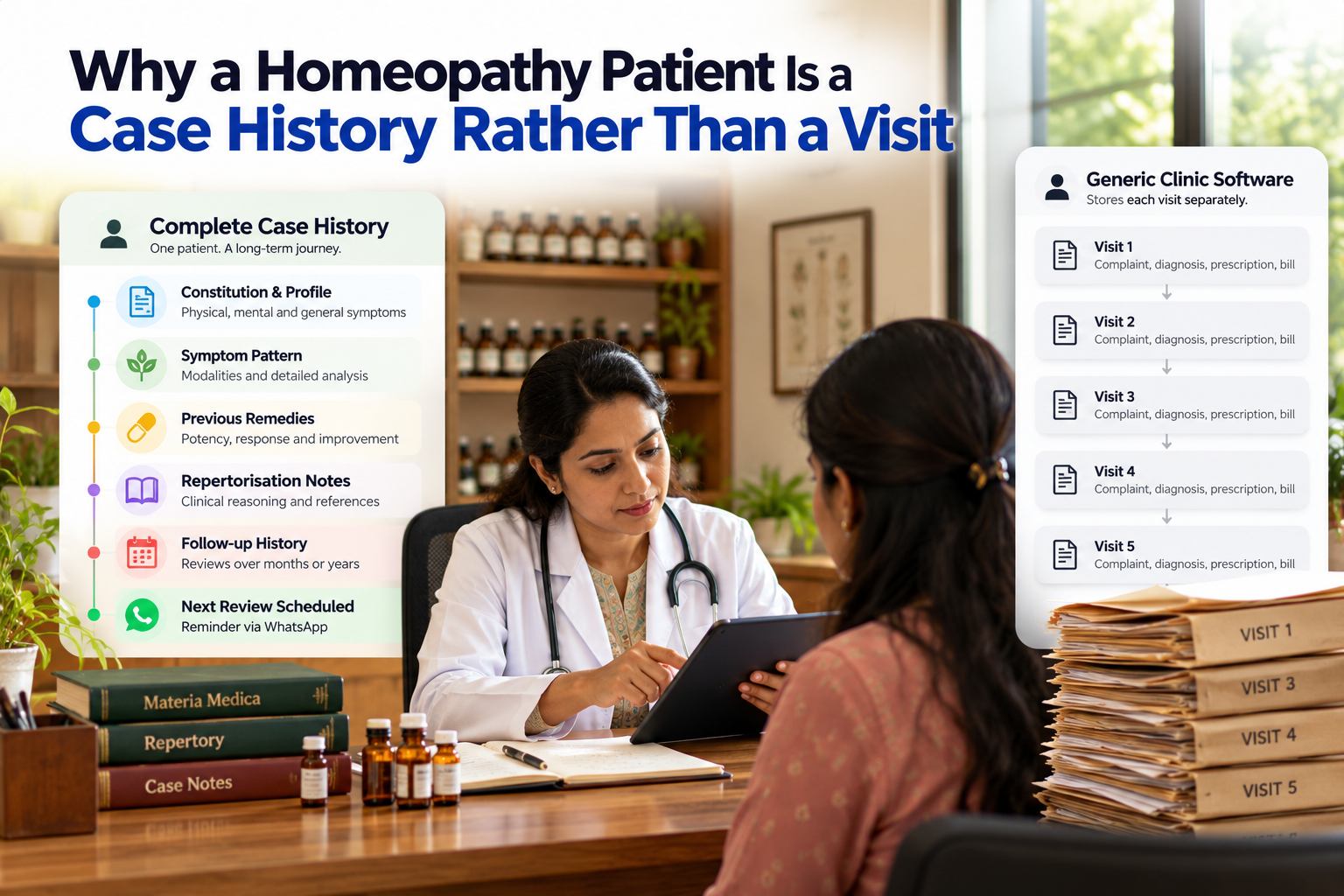
Homeopathic case-taking is detailed by nature.
The doctor records constitution, symptom patterns, modalities, mental and general symptoms, family history, previous remedies and the patient's response to each remedy. Repertorisation notes may sit alongside this information.
Then comes the follow-up.
Did the remedy act? In which direction? Was the potency increased? Was the remedy changed? When should the patient return?
For chronic cases, this history can develop over several years. That means the clinical value of the patient record increases with every consultation.
Generic clinic software usually approaches the record differently. It stores a complaint, diagnosis, prescription and bill for each visit. Once payment is complete, that visit is effectively closed.
For a homeopath trying to understand how a patient responded to a remedy 18 months ago, that structure can mean scrolling through individual visits or returning to a physical file.
The follow-up rhythm is different too. A homeopathy practice needs the next review to be part of the treatment workflow. Ideally, the next appointment is scheduled before the consultation closes and the patient receives a reminder through a channel they actually use.
Where Generic Clinic Software Fails a Homeopathy Practice
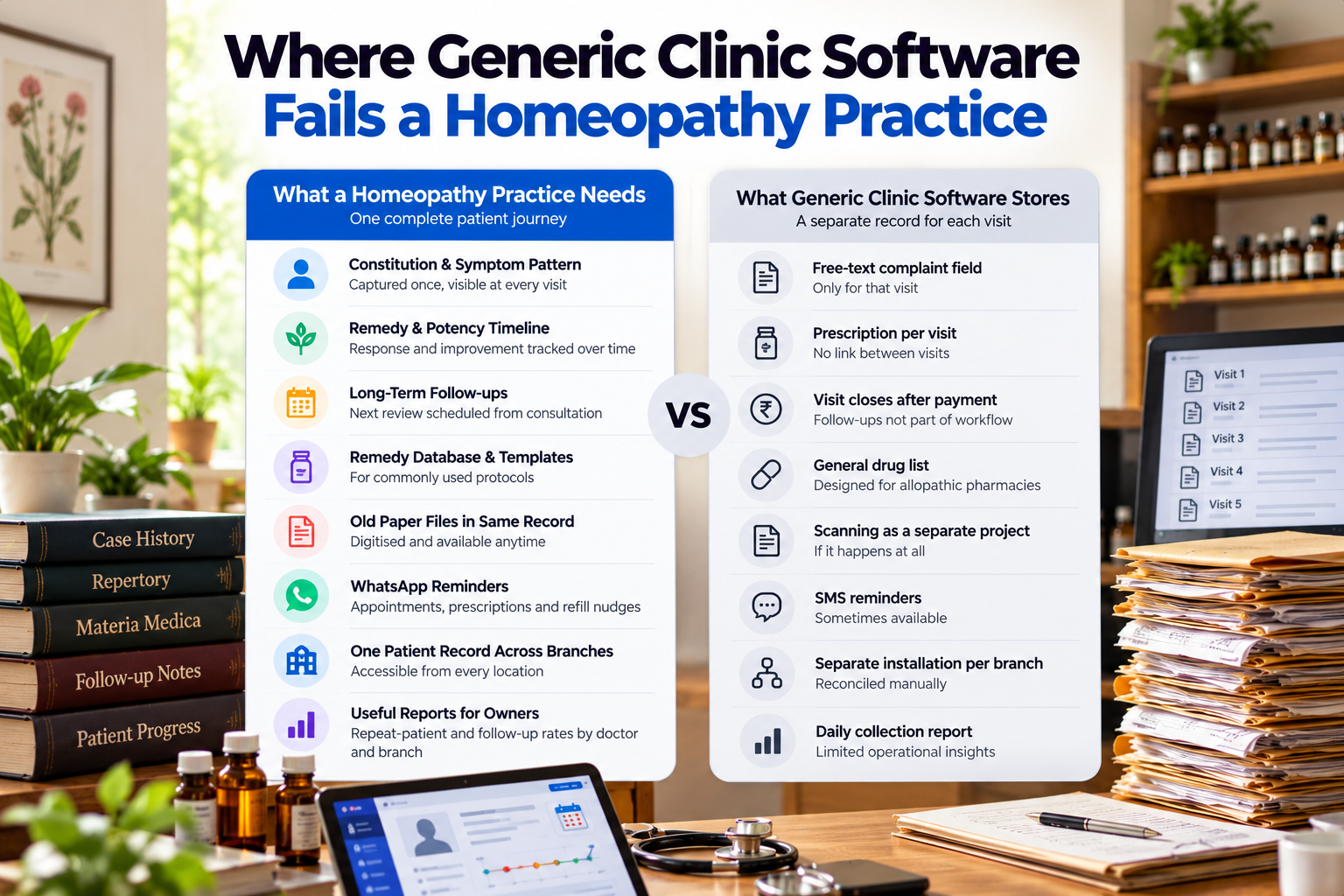
The difference becomes clearer when you look at what a homeopathy practice actually needs.
A homeopathy clinic needs the patient's constitution and symptom pattern captured once and available at every consultation. Generic systems often provide only a free-text complaint field for each visit.
It needs a continuous remedy and potency timeline showing the patient's response and improvement. Generic systems usually store separate prescriptions without connecting the treatment journey.
It needs follow-up scheduling that continues across months or years. Generic software tends to treat payment as the end of the visit.
Doctors need prescription templates built around remedies and commonly used protocols. A generic clinic platform may instead provide a general drug list designed primarily for conventional pharmacy workflows.
Established practices also need old paper files to become part of the same patient history, rather than remain a separate scanning project.
Patients need reminders, prescriptions and refill notifications through WhatsApp rather than relying entirely on SMS.
Multi-branch clinics need one patient record accessible across locations instead of separate installations that have to be reconciled manually.
And owners need reports showing repeat-patient and follow-up rates by doctor and branch—not only daily collections.
These gaps compound over time.
If a clinic with decades of paper records buys software that cannot hold the depth of those records, staff continue using paper. The new software gradually becomes little more than a billing tool, leaving the clinic running two systems in parallel.
That was the situation at Dr. Tathed's Homeopathic Clinic before its system was built: records were split between paper and basic digital files, reception handled scheduling and billing manually, and coordinating work across branches created an ongoing operational burden.
Reception, Doctor and Admin Need Different Screens
Trying to make reception, doctors and administrators work from one shared interface creates another problem.
Each role has a different working day, so each needs a screen designed around its actual tasks.
Reception
Reception should be able to search instantly by patient name, phone number or ID and pull up the relevant history.
Registration needs to capture the essential information: name, age, gender, contact details, presenting condition, referral source, emergency contact and assigned doctor.
Today's appointments should appear in time order with clear statuses. Reception should be able to reschedule an appointment, mark a no-show and trigger a WhatsApp reminder without moving between multiple systems.
Billing should also update when the doctor adds consultation or medicine charges.
One practical detail matters here: referral source is easy to skip when reception is busy, yet it is often something the owner wants to analyse later. Making it a quick selection rather than a typed field improves the likelihood that it is actually recorded.
Doctor
The doctor's screen needs today's patient list and the patient's complete clinical history in one place.
Previous prescriptions, remedy changes, potency history and allergy alerts should be available quickly enough to use during the consultation.
The doctor should be able to create a digital prescription from the remedy database, add dosage and duration instructions, save frequently used protocols as templates, upload reports, digitise old physical files, record clinical notes and improvement levels, and schedule the next follow-up without leaving the consultation screen.
Any charges added during the consultation should flow directly into the billing queue.
Admin
The owner or administrator needs a completely different view.
The admin layer should show patient growth across branches, referral sources, new-versus-repeat patient ratios, demographics and condition categories.
Appointment reporting should cover daily volume, doctor-wise appointments, average waiting time and no-show rates.
Financial reporting should be available by day, week, month, branch, doctor and payment method, alongside dedicated repeat-patient reporting. The system described in the source includes more than 20 report filters and exports to Excel or PDF.
The principle is simple: reception, doctor and admin screens should perform different jobs while feeding the same patient record.
WhatsApp as the Follow-Up Engine
A patient app is only useful when patients actually use it.
WhatsApp is already part of many patients' daily behaviour, which makes it a practical channel for appointment confirmations, reminders, digital prescriptions, dosage instructions, follow-up notifications, remedy refill reminders, report-ready alerts and billing receipts.
These communications can be delivered through the WhatsApp Business API with delivery tracking.
This matters particularly for refills.
A patient who runs out of a remedy during treatment may not proactively call the clinic. A timely refill reminder can prompt the next action without depending on the patient remembering.
At Dr. Tathed's Homeopathic Clinic, the clinic reports 60% fewer no-shows after implementing WhatsApp reminders. These are the clinic's own results, and outcomes can vary depending on patient volume and branch count.
Multi-Branch Reporting the Owner Actually Reads
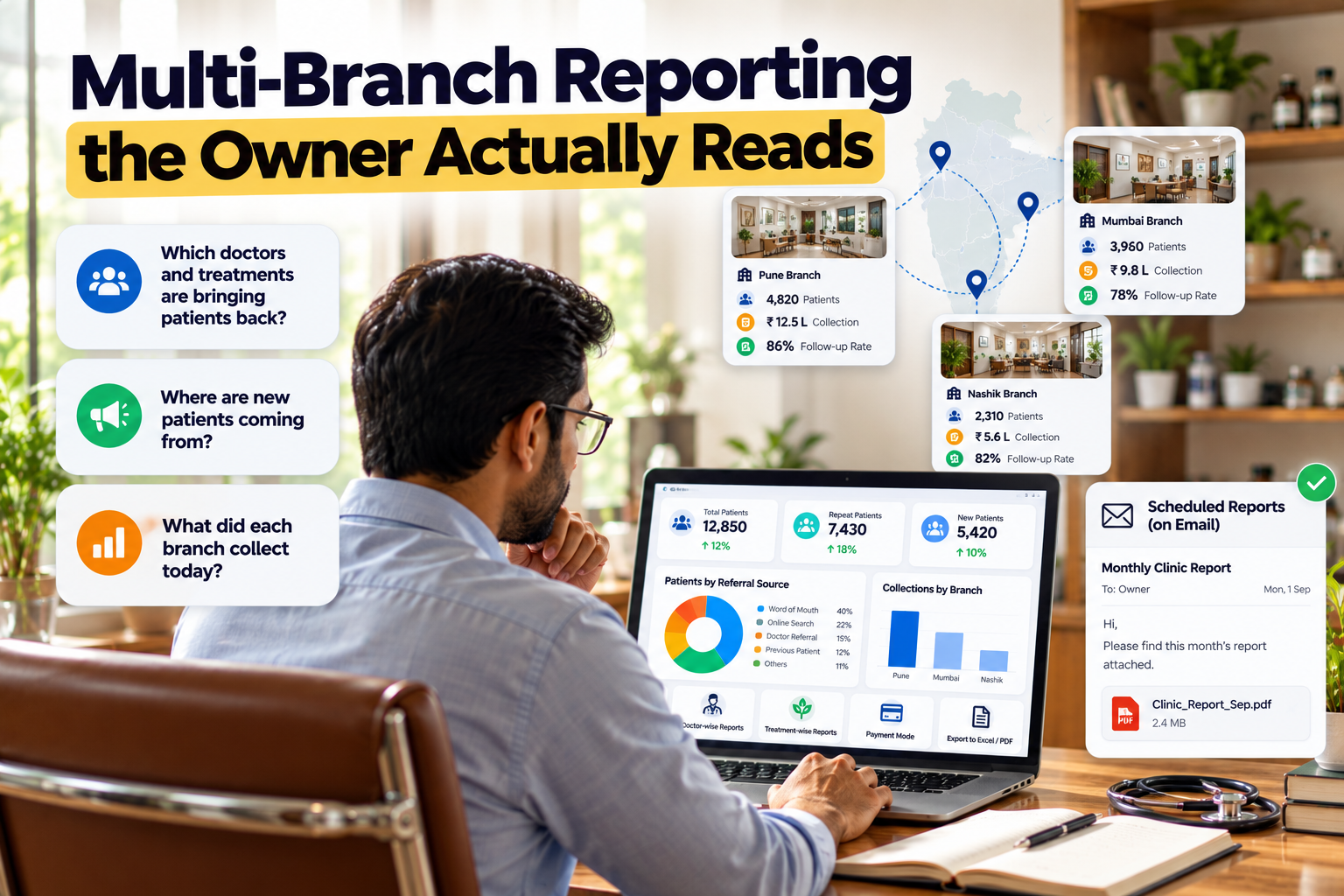
Many clinic reports are designed around accounting.
But an owner often wants answers to three different questions:
Which doctors and treatments are bringing patients back?
Where are new patients coming from?
What did each branch collect today?
A repeat-patient report helps answer the first question. Referral-source reporting addresses the second. At Dr. Tathed's clinic, the data showed that 40% of patients arrived through word of mouth, helping the practice focus more deliberately on patient satisfaction.
Financial reporting by branch, doctor and payment mode addresses the third, while giving management real-time visibility across locations.
There is another adoption lesson here: reports are more useful when owners do not have to remember to log in and find them.
Scheduled delivery of selected reports by email can sometimes be more valuable than another dashboard filled with widgets.
Offline Mode and Paper-File Migration
Two practical objections appear frequently in established practices.
First, doctors may move between rooms or branches where connectivity is unreliable.
Second, the clinic may have years—or decades—of paper records that nobody has time to manually re-enter.
The mobile application addresses the first problem. In the implementation described in the source, the Flutter-based app mirrors the web portal and gives doctors access to today's appointments, notifications, full case histories, quick prescription creation and camera capture for reports and documents. Offline mode allows work to continue and synchronises when connectivity returns.
The migration approach addresses the second.
Instead of running a separate data-entry project, doctors at Dr. Tathed's clinic digitised older records through the doctor dashboard during normal consultations.
Paper therefore moved into the digital patient record gradually as part of daily work.
The clinic reports 100% paperless operations across its branches, with more than 10,000 patient records in the system.
Patient data also needs appropriate protection. In the described system, data is encrypted at rest and in transit, access is role-based, and audit trails record who accessed a record and when.
What Building It for a Real Practice Taught Us
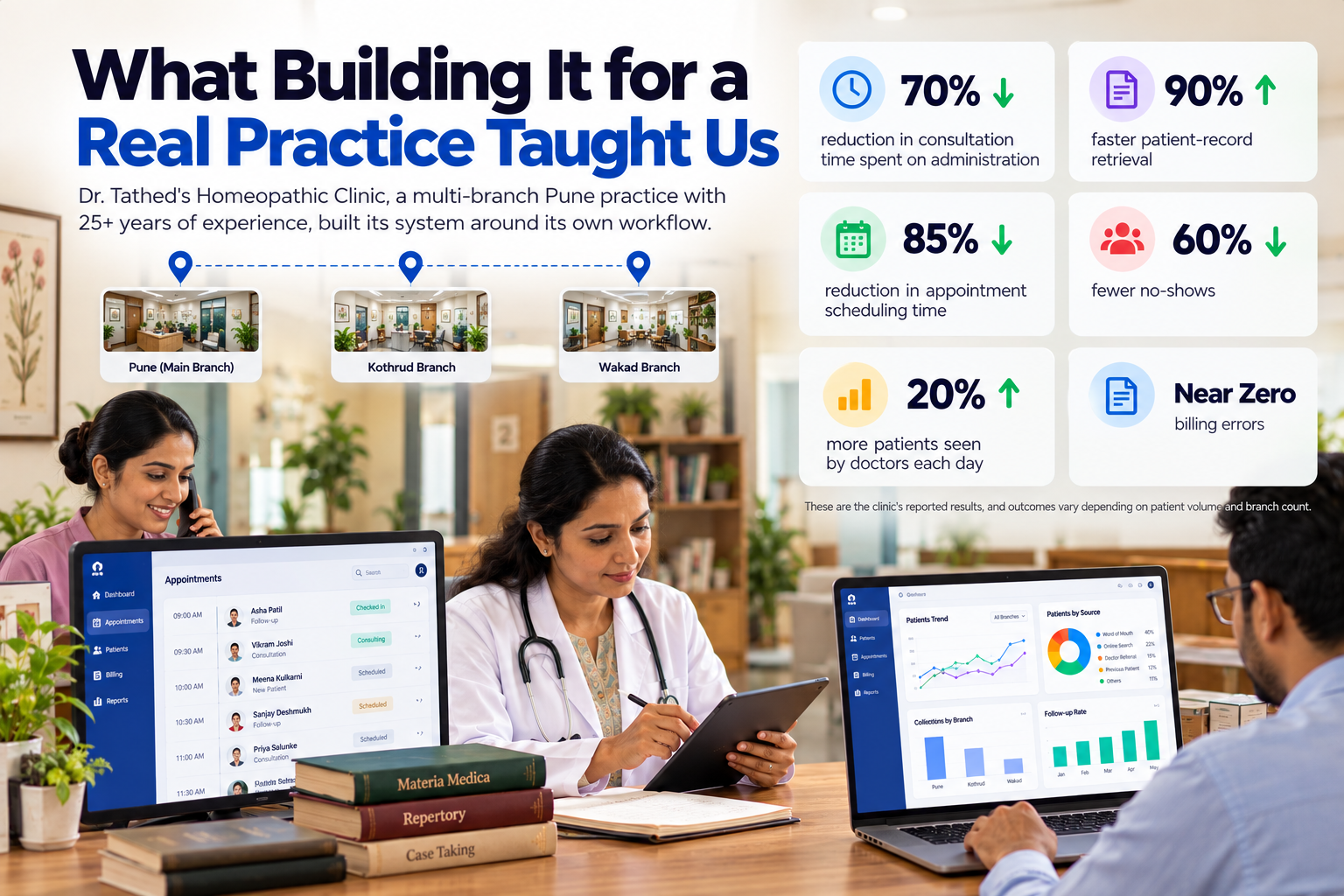
Dr. Tathed's Homeopathic Clinic is a multi-branch Pune practice led by a doctor with more than 25 years of experience.
The reception, doctor and admin portals, along with the companion mobile application, were built around the clinic's existing workflow rather than asking the clinic to adapt itself to a generic software model.
According to the clinic, the resulting system delivered:
- 70% reduction in consultation time spent on administration
- 90% faster patient-record retrieval
- 85% reduction in appointment scheduling time
- 60% fewer no-shows
- 20% more patients seen by doctors each day
- Billing errors reduced to near zero
These are the clinic's reported results, and outcomes vary depending on patient volume and branch count.
Three implementation choices mattered.
First, the data model was designed around homeopathic practice from the beginning. Long-term case history was therefore fundamental rather than something added later.
Second, each role received an interface built around its own working day.
Third, rollout was designed to minimise disruption to a team with more than two decades of established routines. According to the clinic, staff became comfortable with the system within days.
Accucia's View
We believe homeopathy clinic software should be designed around the follow-up, because that is where the treatment journey continues and where much of the practice's clinical and commercial value develops.
A system that starts with a generic OPD visit and tries to bolt long-term case history onto it later is likely to feel unnatural to an experienced homeopath.
Second, it should operate as a homeopathy CRM first.
The remedy database, potency timeline, improvement level, follow-up scheduling and WhatsApp communication layer are not peripheral features. They form the core workflow. Billing and analytics should sit on top of a patient record that already reflects how the practice works.
Third, AI should come after the underlying data and workflow are working properly.
A clinic that is already satisfied with its existing software does not necessarily need to replace it. A natural-language layer can potentially sit on top of the current system so staff can ask questions such as:
“Show me today's follow-up patients.”
“How much collection did we make this week?”
For clinics that want to understand what their existing technology can support before committing to a larger project, Accucia offers a fixed-scope, two-week AI Readiness Audit priced at ₹2–5 lakh, according to the supplied material.
Accucia is headquartered in Pune, India, and has built custom systems since 2018.
Eight Questions a Homeopathy Clinic Owner Should Ask Any Software Vendor
Before choosing a platform, ask the vendor to demonstrate these workflows rather than simply confirming that the features exist.
- Show me a patient's remedy and potency history across three years on one screen. If you only see a list of separate visits, the system is still structured around visits rather than cases.
- Where does the constitution and symptom pattern live, and is it visible at every consultation?
- How does the doctor schedule the next follow-up, and what does the patient receive? Look specifically at WhatsApp communication and refill reminders.
- Can the doctor photograph an old paper case file and add it to the patient's record during a consultation?
- What can the doctor see when there is no internet connection? Ask the vendor to demonstrate offline mode rather than simply saying it exists.
- Does one patient have one record across all branches, or does every branch operate its own installation?
- Which report tells me which doctors and treatments bring patients back, and can that report reach me automatically every week?
- Who can access each type of record, and is every access logged? Role-based access and an audit trail should be basic requirements for patient information.
Frequently Asked Questions
What is homeopathy clinic management software?
Homeopathy clinic management software is a clinic CRM designed around the way homeopathy practices treat patients.
Instead of relying on paper case histories, appointment registers and prescription pads, it creates a searchable, role-based platform for reception, doctors and administrators. Importantly, it tracks constitution, remedies, potency changes and follow-ups across months or years rather than treating every appointment as an isolated visit.
How is a clinic CRM for homeopathy different from generic clinic software?
Generic clinic software generally stores a visit: complaint, diagnosis, prescription and bill.
A homeopathy CRM stores the case: constitution, symptom pattern, remedy history, potency changes, patient response and scheduled follow-up.
The goal is to let the doctor see the entire treatment journey rather than reconstructing it from separate visits.
Can the software run a multi-branch homeopathy practice?
Yes. In the system described here, branches work from the same patient record while billing and analytics feed a central admin panel.
Owners can review patient growth, referral sources, new-versus-repeat ratios and collections by branch, doctor and payment method, with more than 20 filters and export options for Excel or PDF.
Do doctors have to re-enter old paper case files?
Not necessarily.
At Dr. Tathed's Homeopathic Clinic, doctors digitised older records through the doctor dashboard during normal consultations rather than treating migration as a separate data-entry project.
The clinic reports that this approach helped it move to fully paperless operations across its branches. Migration timelines will naturally vary according to the number of patients, branches and historical records involved.
Can Accucia add AI to clinic software we already use?
Yes. According to the supplied material, Accucia can add a natural-language layer on top of an existing clinic system instead of requiring the clinic to replace the entire platform.
That can allow staff to ask questions such as “Show me today's follow-up patients” or “How much collection did we make this week?” and retrieve answers from the clinic's own data.
Final Takeaway
A homeopathy clinic does not need generic clinic software with a few extra fields added.
It needs a system built around long-term case history, remedy and potency tracking, follow-ups, WhatsApp communication, multi-branch continuity and role-specific workflows.
The easiest test is simple:
Ask the vendor to show you a patient's complete three-year treatment journey on one screen.
If the answer is a list of disconnected visits, the software is still solving the wrong problem.
Transform Your Clinic Operations Today.