Visitor Check-In System for Offices, No App Needed
Quick Answer
A visitor check-in system replaces the reception register with a digital flow: the visitor scans a QR code, books or confirms a slot in the browser, checks in at the door the same way, the host is notified, and the system routes the visitor to the right desk while keeping a record you can audit later. No app download, no account, no queue at the counter. Accucia's Visitor Management System runs this way in offices and at a public counter that handled more than 2,000 walk-ins a day. By Mr. Sumeet Katariya, Accucia Softwares Pvt. Ltd
What the paper register costs you
Walk into most offices in India and the first thing you meet is a register. Name, company, whom to meet, time in, signature. It feels harmless. Look at what it actually is.
It is a list of every client, candidate and supplier who visited you, readable by anyone standing in the lobby, including the competitor's sales representative waiting after them. It cannot be searched, so when the auditor or the police ask who was in the building on a given afternoon, someone goes through pages by hand. It tells the host nothing until reception phones them, and it tells management nothing at all.
Then there is the queue. The register takes a minute or two per visitor, which is fine until four people arrive together before a 10 AM meeting. The receptionist is now a bottleneck, and the visitors' first experience of your company is standing in a line to write their phone number in a book.
What a digital check-in system does
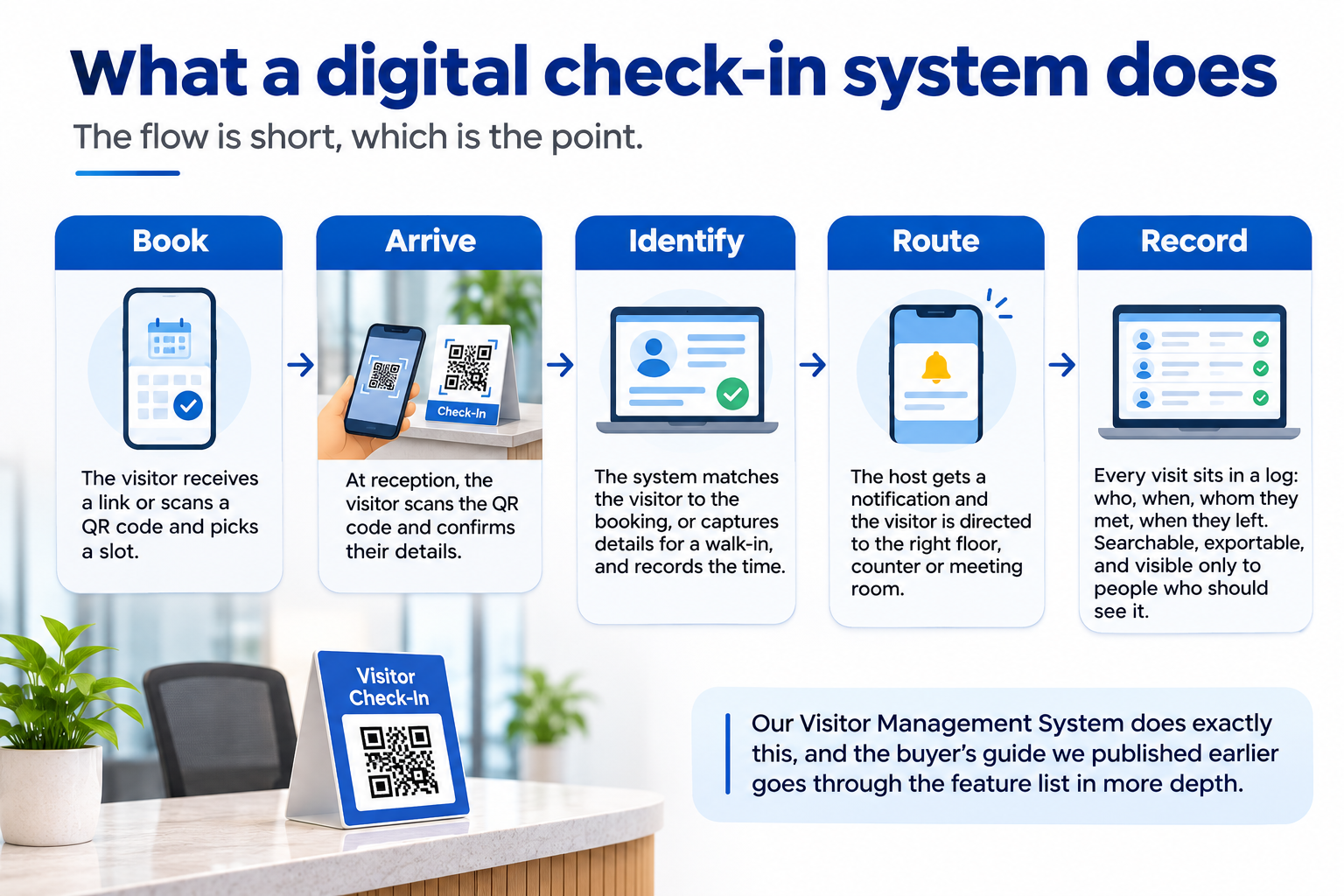
The flow is short, which is the point.
Book. The visitor receives a link or scans a QR code and picks a slot. For a private office this might be optional; for anywhere with real footfall it is the mechanism that spreads arrivals across the day instead of piling them at the door.
Arrive. At reception there is a QR code on a stand. The visitor scans it with their phone camera and confirms who they are and whom they are meeting. Where a slot was booked, this takes seconds.
Identify. The system matches the visitor to the booking, or captures the details for a walk-in, and records the time.
Route. The host gets a notification. In a larger building the visitor is directed to the right floor, counter or meeting room rather than asking at the desk.
Record. Every visit sits in a log: who, when, whom they met, when they left. Searchable, exportable, and visible only to people who should see it.
Our Visitor Management System does exactly this, and the buyer's guide we published earlier goes through the feature list in more depth. What follows is the part buyers tend to underweight.
Why no app download is the whole design
Ask anyone who has deployed visitor software what killed the first attempt, and the answer is usually the app. Visitors will not install an application for a single visit. Suppliers will not. Candidates arriving for an interview certainly will not. The moment the flow depends on a download, reception goes back to the register for "just this one", and within a month the register is the system again.
The browser flow removes that failure point. A phone camera, a QR code, a web page. Nothing to install, nothing to remember, nothing to update. It works on the cheapest Android phone in the building and on the visitor's phone from another country. We wrote about why the QR entry flow needs no app in the context of a public office, and the reasoning is identical for a corporate lobby.
The same mechanics at 2,000 visitors a day
An office with forty visitors a day is a gentle test. Here is the harder one.
A government organisation in Maharashtra had more than 2,000 people walking in every day. Queues formed before opening. Counter staff spent their time managing crowds instead of resolving cases. We built the QR appointment and visitor management flow for that counter: a citizen scans a code, books a slot, arrives when the slot says, and the system handles identification and routing at the door. No app download, because most of those citizens would never have installed one.
Within 45 days, daily walk-ins fell from over 2,000 to under 700. The cases did not disappear. The crowding did, because people who used to stand in line now arrived by appointment.
The part nobody budgets for, and the part we would tell any office to plan for, was adoption at the counter. The hard change was staff being willing to turn a walk-in away politely and book them a slot instead. The software was ready weeks before the habit was. The full story is in the government visitor management case study.
If the mechanics hold at that volume, they hold in your lobby.
What the data protection law means for the register
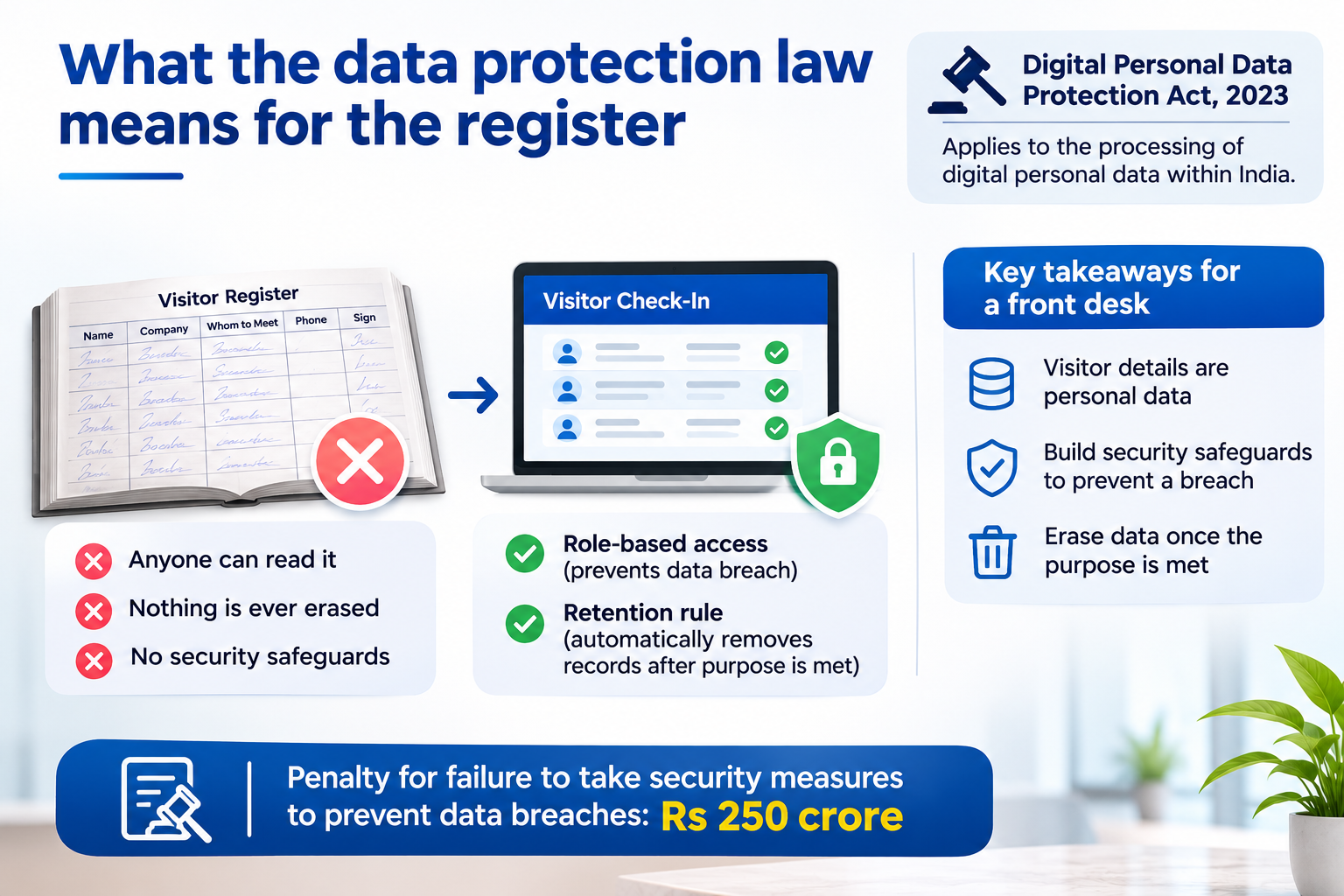
The register is personal data, and India now has a statute about that. The Digital Personal Data Protection Act, 2023 applies to the processing of digital personal data within India and, in the words of PRS Legislative Research's summary of the Bill, defines personal data as "any data about an individual who is identifiable by or in relation to such data." A visitor's name, phone number and the person they came to see qualify the moment they are typed into anything.
Two obligations in that summary matter for a front desk. Data fiduciaries must "build reasonable security safeguards to prevent a data breach," and must "erase personal data as soon as the purpose has been met." A paper book in the lobby does neither: anyone can read it and nothing in it is ever erased. A digital check-in system can do both, but only if it is configured to. Role-based access covers the first. A retention rule, agreed with whoever owns compliance in your company, covers the second: visitor records kept for as long as the security or audit purpose needs them and then removed, automatically, rather than piling up in an export nobody owns.
The PRS summary also lists a penalty of Rs 250 crore for failure to take security measures to prevent data breaches. We are not lawyers and this is not legal advice; what we can say is that the reception register is the one personal-data store in most companies that nobody has ever reviewed, and the digital flow is the cheapest place to start.
How to roll it out without losing reception
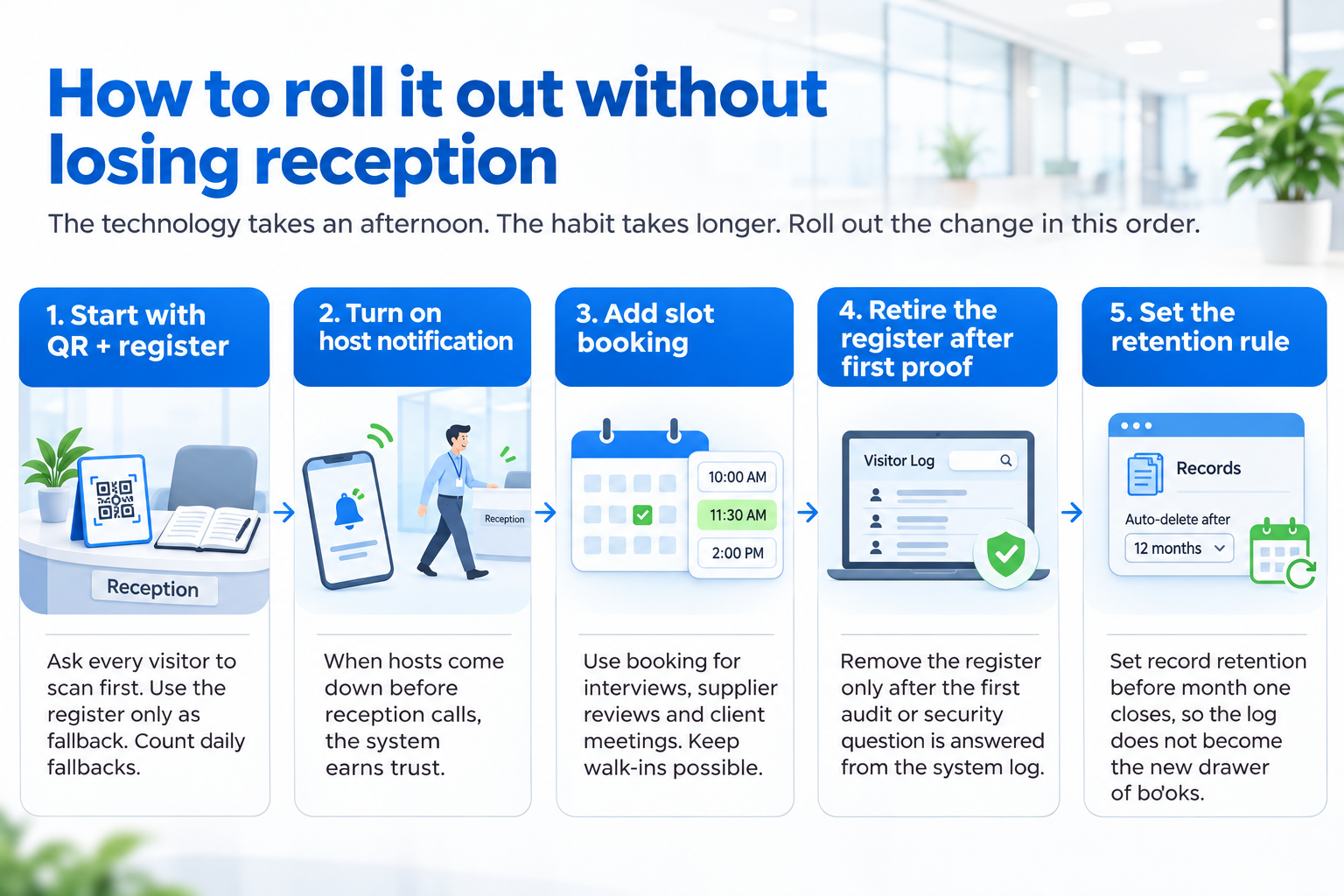
The technology takes an afternoon. The habit takes longer, and that is where rollouts fail, so here is the order we recommend.
Put the QR stand on the desk and keep the register next to it. Reception asks every visitor to scan first and falls back to the book only when a phone will not cooperate. Count the fallbacks each day; they should fall to near zero within the first weeks, and the reasons for the ones that remain are your configuration list.
Turn on host notification on day one. The first time a host walks out to reception before the receptionist has picked up the phone, the receptionist becomes the system's advocate.
Add slot booking for the visits you can predict: interviews, supplier reviews, client meetings. Walk-ins stay possible. The goal is to move the predictable visits off the peak, not to turn visitors away.
Retire the register only after the first audit or security question has been answered from the system's log. That is the moment everyone in the building understands why the change was made.
Set the retention rule before the first month closes, so the log never becomes the new drawer of books.
Common mistakes with office visitor systems
Buying the tablet, not the flow. A tablet at reception that asks visitors to type their details is a digital register. It still queues, and it still needs a receptionist to operate it. The QR flow runs on the visitor's own phone, so four arrivals check in at once.
Making the app the gate. Covered above, and still the most common reason a first attempt fails.
Giving everyone the history. Reception needs today. Security and compliance need history. Nobody in the lobby, and few people in the building, need either. If the access model is not role-based, the digital system has reproduced the register's worst feature at higher speed.
Skipping the counter conversation. At the public counter that handled more than 2,000 walk-ins a day, the hard part was staff learning to book a walk-in into a slot instead of serving them on the spot. An office lobby has a gentler version of the same problem, and it is still a conversation someone has to have with the front desk.
What this looks like in month three
A quarter after go-live, the register is gone from the desk. Predictable visits arrive against booked slots and walk-ins check in on their own phones. Hosts receive a notification and reception has stopped making the phone call. When security or an auditor asks who was in the building on a given afternoon, the answer is a filtered export rather than a search through pages. The retention rule is running, so the log holds what the purpose needs and nothing older. And the receptionist, who was the bottleneck at 10 AM, is handling the exceptions instead of the queue.
What to ask a vendor
Accucia's view
The register at reception is a security hole, an audit problem and a queue, and the only visitor system that replaces it for good is one that asks nothing of the visitor beyond a phone camera. Buy for the no-app flow, plan for the counter habit, and insist on a vendor who can point to a door that handles more traffic than yours.
Watch: 2,000 visitors a day became 700. Here is how.
Read the edition: The Enterprise AI Edge, Ed.21, Citizens at the gate.
If your reception still runs on a register, the free AI Readiness Assessment maps the front door along with the rest of your systems and tells you what to fix first.
FAQ
What is a visitor check-in system?
A visitor check-in system records every visitor who enters a building: who they are, who they came to see, when they arrived and when they left. A digital version replaces the paper register with a QR code or front-desk screen, so the record is searchable, the host is notified automatically, and the visitor can be routed to the right desk without a queue.
Do visitors need to download an app?
No. Visitors scan a QR code with their phone camera, book or confirm a slot in the browser, and check in at the door the same way. No app, no account, no download. This matters most for one-time visitors, who will not install anything for a single visit.
Can a digital check-in system handle high daily footfall?
Yes. The system runs at a government organisation in Maharashtra that received more than 2,000 walk-ins a day. After QR appointments and visitor management went live, daily walk-ins fell to under 700 within 45 days, because people who used to stand in line now arrive by appointment.
How long should visitor check-in records be kept?
For as long as the security or audit purpose requires and no longer. The Digital Personal Data Protection Act, 2023 requires personal data to be erased once its purpose has been met, so the retention period should be set with whoever owns compliance in your company and applied automatically by the system rather than left to an export nobody reviews.
Is a visitor check-in system only for large offices?
No. The flow is the same for a forty-visitor office and a public counter. What changes is the configuration: whether slots are optional, which hosts or counters visitors are routed to, and what the audit log needs to hold. Smaller offices gain mainly on security and host notification; busy sites gain on the queue.
Simplify Visitor Check-Ins. Explore Our Solution