
Field Force Software Demo: 9 Things It Must Show
Quick Answer
A field force management software demo should be run from the technician's phone, not the manager's dashboard. Make the vendor show nine things live: an offline job card, a preventive maintenance job generated from a contract, a breakdown call with a running SLA clock, arrival confirmation, parts and photos on the job, a customer signature, a statutory inspection form, an SLA report by technician, and a WhatsApp notification to the customer. If any of the nine needs a workaround, the product is not finished. By Mr. Sumeet Katariya, Accucia Softwares Pvt. Ltd
Why demos start in the wrong place
Almost every field force software demo we have sat through, including ones we have given, opens on a map. Dots moving across a city. A manager's view of who is where. It looks impressive and it answers a question nobody in the room has actually asked.
The person who decides whether the software works is the technician in a plant room with one bar of signal and a customer waiting. If the app loses the job card when the signal drops, that technician will finish the job on paper and type it in later, or not at all. From that day the dashboard shows what people remembered to enter, which is a different thing from what happened.
So the first instruction for any demo is simple. Ask the vendor to put the phone on the table and start there.
The nine things to make them show live
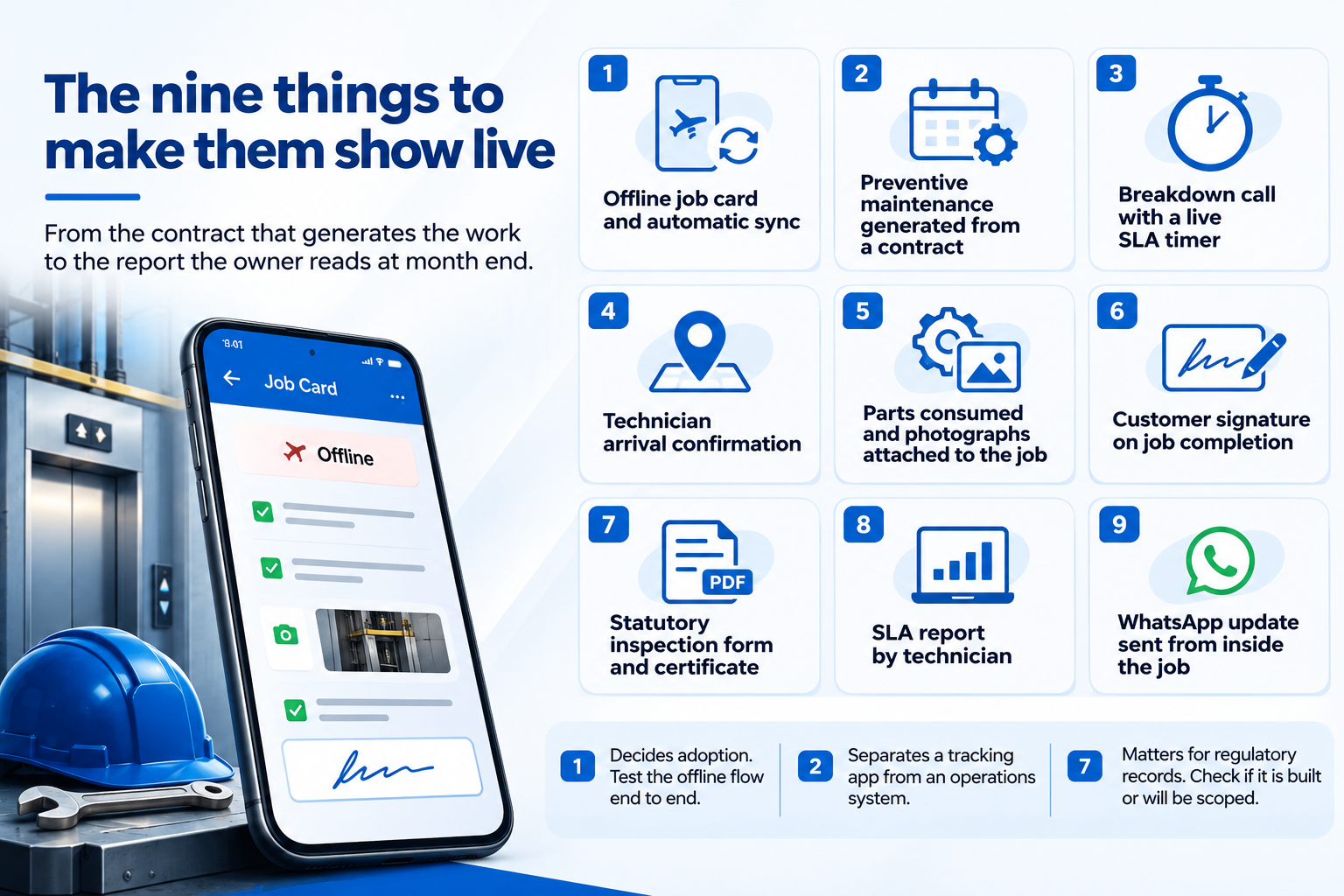
We have grouped these the way a service day runs, from the contract that generates the work to the report the owner reads at month end. Watch for the word "usually" in the vendor's answers. It tends to mean the feature exists on a slide.
1. Offline job card and automatic sync
Ask the vendor to open a job card on the technician's phone, switch on flight mode, complete a checklist and take a photograph. Then restore the connection and check whether the complete record syncs back without losing any information.
2. Preventive maintenance generated from a contract
Ask the vendor to create a service contract with a maintenance schedule. Watch whether the system generates the upcoming preventive maintenance jobs automatically instead of requiring a coordinator to enter each visit manually.
3. Breakdown call with a live SLA timer
Log a breakdown call and watch when the response-time clock starts. The system should connect the customer's complaint, the assigned technician and the agreed service commitment.
4. Technician arrival confirmation
Ask the technician to confirm arrival at the customer site through the mobile app. Check whether that confirmation appears against the correct job and records the visit accurately.
5. Parts consumed and photographs attached to the job
Have the technician record a spare part used during a service visit and attach photographs. Check whether both remain connected to the job record for future reference and billing disputes.
6. Customer signature on job completion
Complete the job on the mobile app and capture the customer's signature. Verify that the signed record is saved with the job history and can be retrieved later.
7. Statutory inspection form and certificate
Ask the vendor to demonstrate the inspection format required for your equipment. Watch whether the technician can complete it in the system and whether the certificate is generated as a PDF attached to the asset.
8. SLA report by technician
Ask the vendor to generate a report showing service performance by technician. Check that the figures come from completed jobs and recorded response times rather than manually prepared data.
9. WhatsApp update sent from inside the job
Ask the vendor to send a customer update directly from the service job. Check whether the message is connected to the job record rather than being sent separately from someone's personal phone.
A few notes on the ones that get skipped most often.
Number one is the one that decides adoption, and the one vendors like least. Flight mode on, open the job, fill the checklist, take a photo, flight mode off. Watch whether the record arrives intact. Our own field service management platform was built around this test because the elevator service companies running it work in lift shafts and plant rooms where there is no signal, and the job still has to be recorded.
Number two separates a tracking app from an operations system. If the coordinator still types every preventive maintenance visit into a calendar, the contract is not really in the software. It is in the coordinator's head, and the coordinator takes leave.
Number seven matters wherever a regulator asks for records. For lifts in Maharashtra, the inspection form follows the format in the Rules under the Maharashtra Lifts and Escalators Act 2017, and the certificate comes out as a PDF attached to the asset. Ask what your equipment's equivalent is and whether the vendor has built it or will "scope it during discovery". Both answers are acceptable. Only one of them is a finished feature.
Field force or field service, which one are you buying
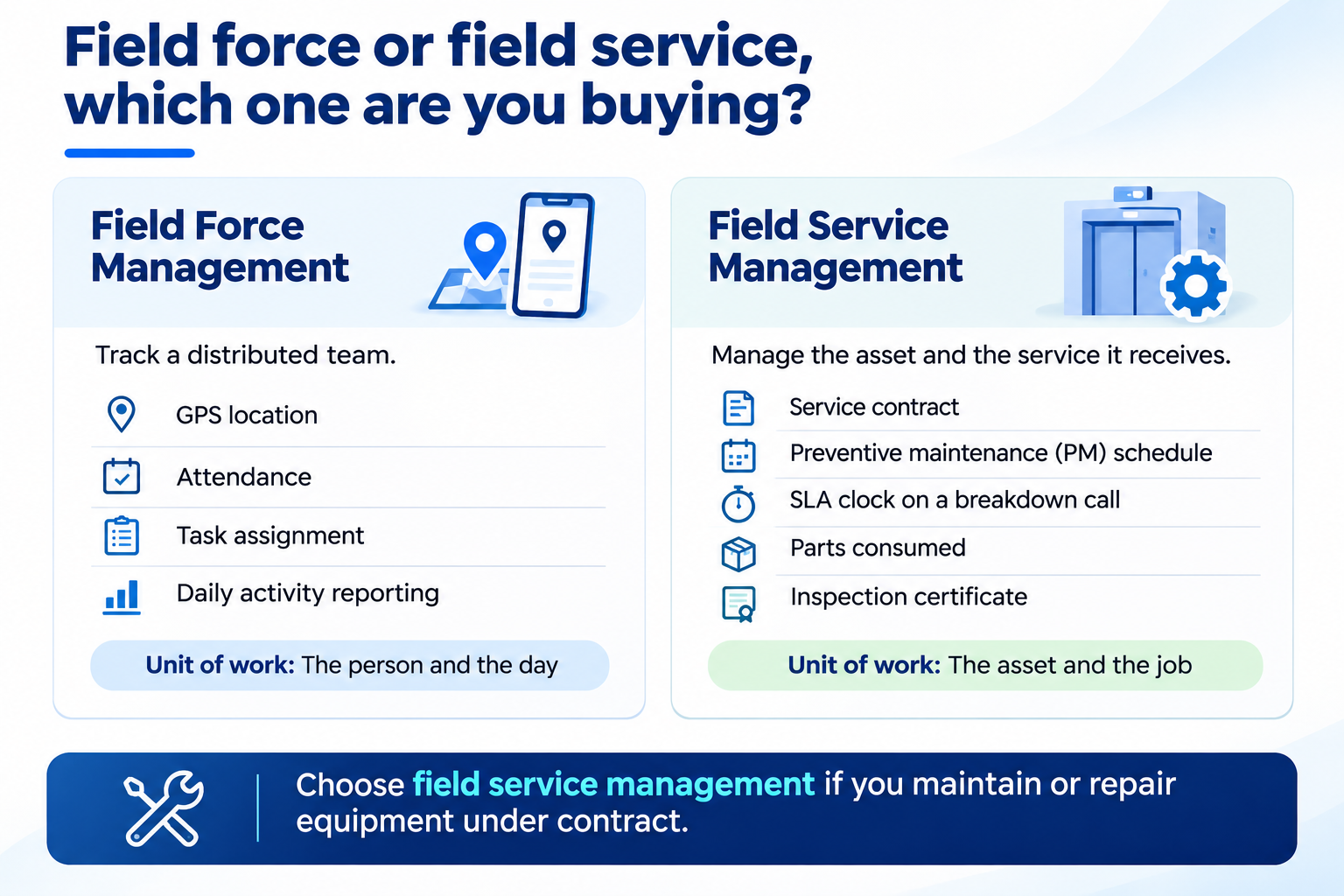
The two terms get used as if they were the same thing, and the search results treat them that way too. They are not.
Field force management usually means tracking a distributed team: GPS location, attendance, task assignment, daily activity reporting. Sales representatives, survey teams, delivery staff. The unit of work is the person and the day.
Field service management is built around the asset being serviced: the contract covering it, the preventive maintenance schedule it generates, the SLA clock on a breakdown call, the parts consumed and the inspection certificate produced at the end. Maintenance contractors, equipment manufacturers with service arms, facility management companies. The unit of work is the asset and the job.
If your teams visit customer sites to maintain or repair equipment under contract, you need field service management, whatever the vendor calls the product. If you mainly need to know where staff are and what they did today, field force management is the lighter fit. We build both, and we wrote up how multi-site teams actually track work and how a field force system is put together separately for that reason.
The demo checklist above leans towards field service, because that is where the expensive mistakes happen. A staff-tracking app that falls short costs you some visibility. A service system that falls short costs you an SLA penalty, a missed statutory inspection, or a customer who cancels the contract.
What to check in your own operation before the demo
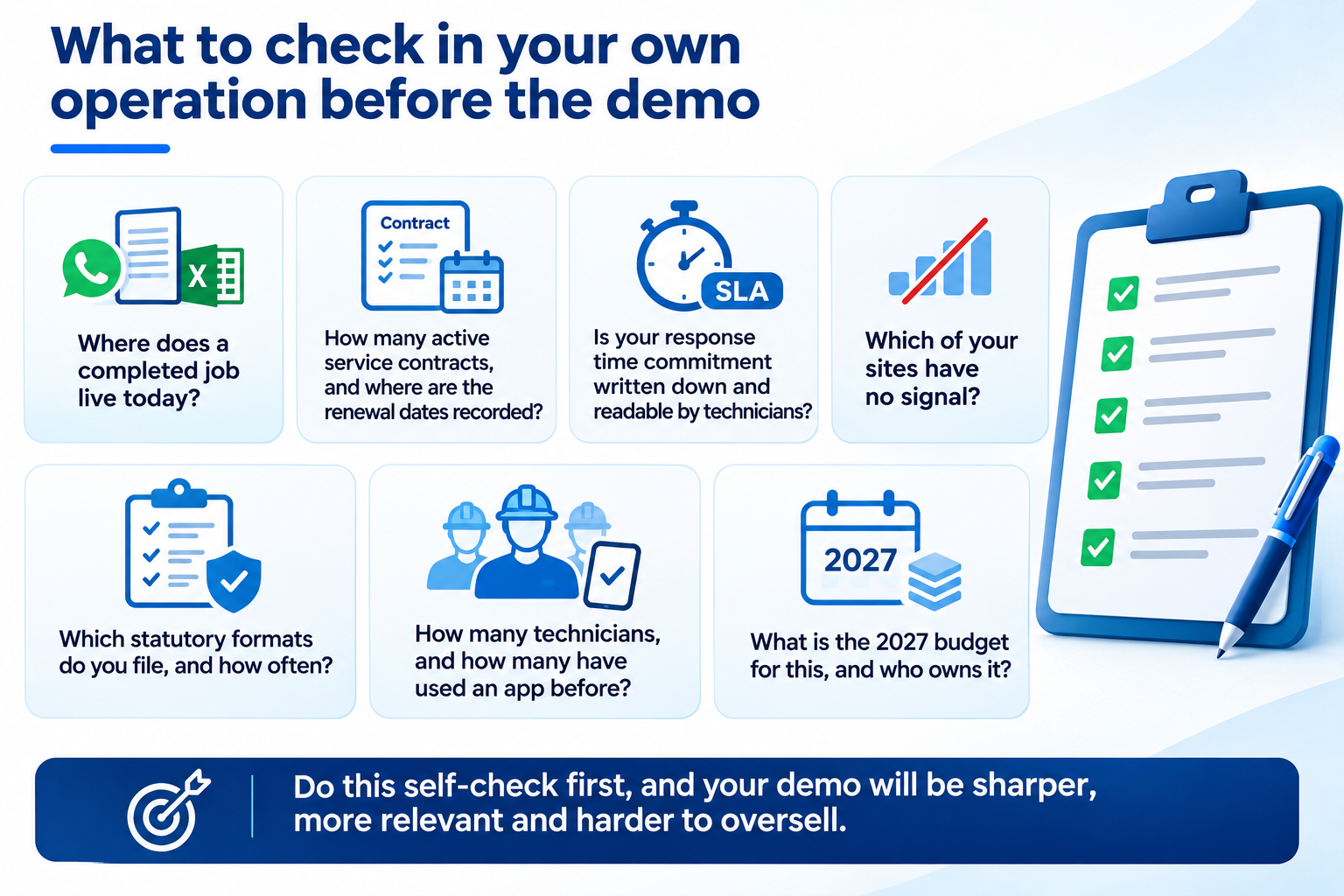
The demo tests the vendor. This list tests you, and it takes an afternoon. Walk it before the meeting and the nine checks above become sharper, because you will know which ones your operation will break first.
- Where does a completed job live today? If the answer is a WhatsApp group, a paper job card and a coordinator's Excel sheet, write down all three. That is the migration the vendor has to plan for.
- How many active service contracts do you hold, and where is the renewal date for each one recorded? If it is in someone's head, the preventive maintenance test (number two above) matters more than anything else on the list.
- Is your response time commitment written anywhere a technician can read it? An SLA clock can only measure a promise that has been defined.
- Which of your sites have no signal? List them. Those are the sites the offline test has to be run at, not the vendor's office.
- Which statutory formats do you file, and how often? Under the Maharashtra Lifts, Escalators and Moving Walks Act, 2017, Section 17(1) requires every lift, escalator or moving walk to be inspected periodically at least once in a year. Your equipment will have its own equivalent; find the form before the demo so you can hand it to the vendor.
- How many technicians, and how many of them have used any app for work before? That number sets the training plan, and it is the number vendors never ask for.
- What is the 2027 budget for this, and who owns it? Gartner forecasts software spending in India to increase 17.6 percent in 2026, so the money is moving. The question is whether yours lands on the technician's phone or on another dashboard.
Common mistakes buyers make after a good demo
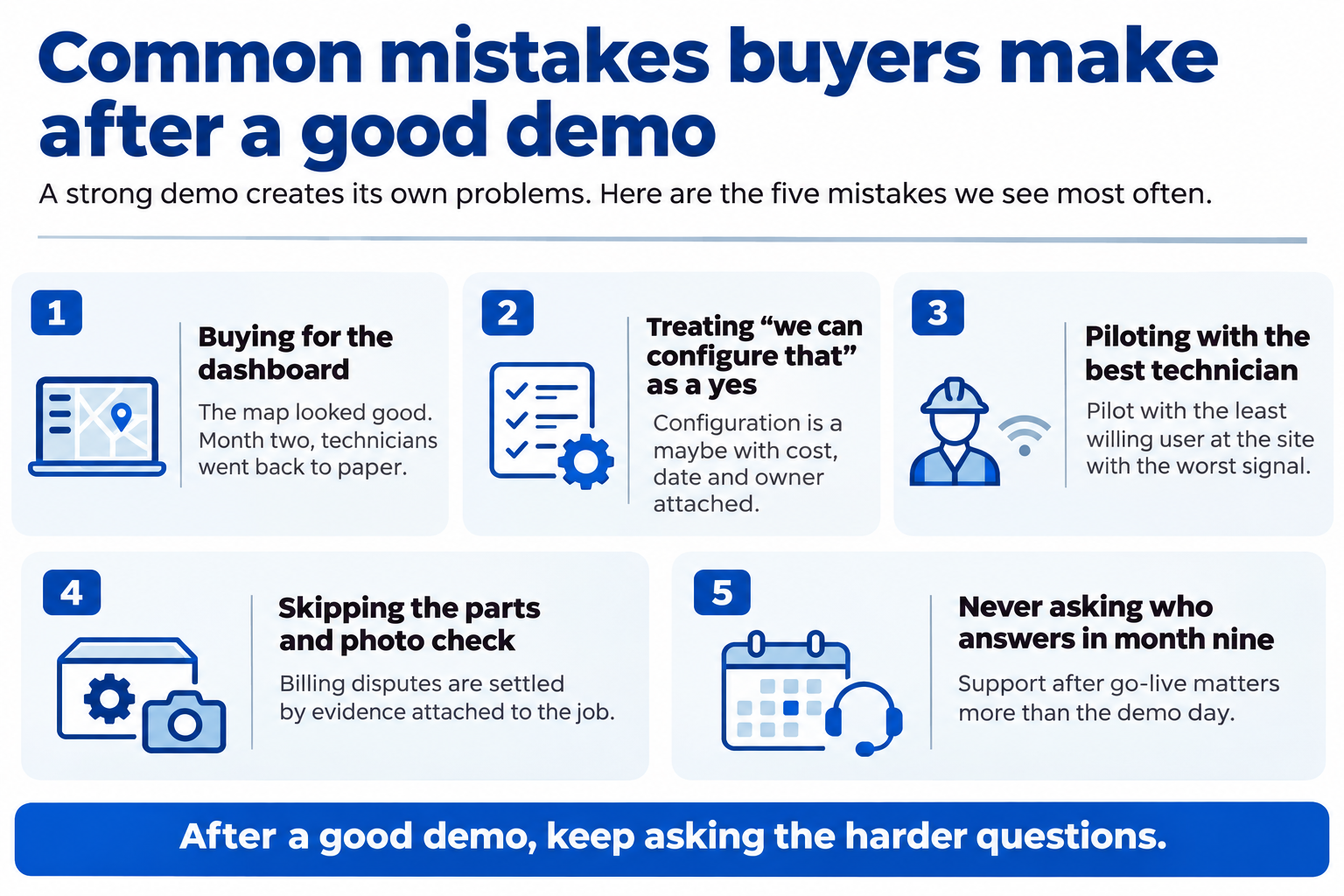
A strong demo creates its own problems. The product looked finished, so the buyer stops asking questions at exactly the point where the questions start to matter. These are the ones we see most often.
- Buying for the dashboard. The owner liked the map, signed, and found out in month two that the technicians had gone back to paper. The dashboard then shows a fraction of the work and everyone decides the software failed.
- Treating "we can configure that" as a yes. It is a maybe with a cost attached. Every configurable item from the demo belongs in the contract as a line item with a delivery date and a named owner.
- Piloting with the best technician. The most capable person on the team will make any app work. Pilot with the one who least wants it, at the site with the worst signal, and you will learn what the rollout actually costs.
- Skipping the parts and photo check. Billing disputes are settled by evidence attached to the job. If the photos sit on a personal phone, the dispute is settled by memory.
- Never asking who answers in month nine. The next section is about that.
What this looks like in month three
Buyers rarely ask what success looks like a quarter after go-live, so the vendor never has to describe it. Here is what we would expect to be true by month three of a field service rollout, and what we would want a buyer to hold us to.
Every active contract is loaded, and the preventive maintenance jobs for the quarter were generated by the system rather than typed in. Breakdown calls are logged at the moment they arrive, so the response clock starts from the customer's call and not from the dispatcher's memory. Job cards are closed on the phone on the day of the visit, including at the sites with no signal, because the offline test was passed at those sites before go-live and not in a conference room. The first monthly SLA report has been run from live data, and the numbers in it have been argued over, which is the sign that people believe them. And at least one change request has come in from the field, because technicians who use a tool start asking for things from it.
None of those are outcomes a vendor can promise with a percentage. They are observable conditions, and a buyer can check each one without a report. If month three does not look like that, the problem is usually one of the five mistakes above, and it is fixable.
The question to ask about month nine
One more thing the demo will not show you, so ask it out loud. Who do we call in month nine, when the person who gave this demo has moved to the next prospect?
Field operations software changes after go-live more than most categories. A new contract type arrives. A customer wants a different inspection format. A state changes a rule. The honest answer names a person and describes a process for small changes. A support ticket queue is also an answer, and it tells you what year two will feel like.
Ashok Traders, an India-based distributor, runs a field service mobile app we built for exactly this kind of daily operation, and the work did not stop at go-live. It rarely does.
Accucia's view
A field force demo that starts on the dashboard is a sales presentation. A demo that starts on the technician's phone, offline, is a product test. Insist on the second one, run the nine checks in order, and treat every "we can configure that" as a line item to be written into the contract with a date. The software will be judged by the people who use it in the field, so that is where the evaluation has to begin.
Read the edition: The Enterprise AI Edge, Ed.20, When the form is longer than the job.
If your field operation runs on a tracking app, WhatsApp groups and a coordinator's memory, start with the free AI Readiness Assessment. It maps where the job data actually lives today and what to fix first.
FAQ
What should a field force management software demo include?
A useful demo runs from the technician's phone and shows an offline job card syncing back, a maintenance job generated from a contract, a breakdown call with a live SLA timer, arrival confirmation, parts and photos on the job, a customer signature, a statutory inspection form, an SLA report by technician, and a WhatsApp update sent from inside the job.
What is the difference between field force and field service management?
Field force management tracks a distributed team: location, attendance, task assignment and daily reporting. Field service management is built around the asset being serviced: its contract, preventive maintenance schedule, SLA clock, parts and inspection records. Teams maintaining equipment under contract need field service management; teams that mainly need staff visibility can use field force management.
Why does offline capture matter so much in a field app?
Technicians work in plant rooms, lift shafts and basements where signal drops. If the app loses the job card when the connection goes, the technician records the job on paper and the system only holds what was retyped later. Offline capture with reliable sync is what keeps the record complete.
How long should a field service management software demo take?
Long enough to run the nine live checks in order from the technician's phone. Plan for sixty to ninety minutes with questions. A twenty-minute dashboard walkthrough is a sales presentation. Ask for the longer session, bring your own contract, inspection form and a site with no signal in mind, and watch what needs a workaround.
Can field service software produce statutory inspection certificates?
Yes, where the vendor has built the regulatory format in. For lifts in Maharashtra, the inspection form follows the format in the Rules under the Maharashtra Lifts and Escalators Act 2017 and the certificate is generated as a PDF attached to the asset record. For other equipment, ask whether the format is built or still to be scoped.
Test Before You Invest. Book Your Free AI Readiness Assessment.