
Field Service Management: How Multi-Site Teams Track Work
Quick Answer
Multi-location service businesses close the gap between the job site and the office with field service management software built around two rules: the field app must be faster than a phone call for the technician, and the office must get back job status, proof of work and payment state without asking anyone for it. By Mr. Sumeet Katariya, Accucia Softwares Pvt. Ltd.
The visibility gap in multi-location service operations
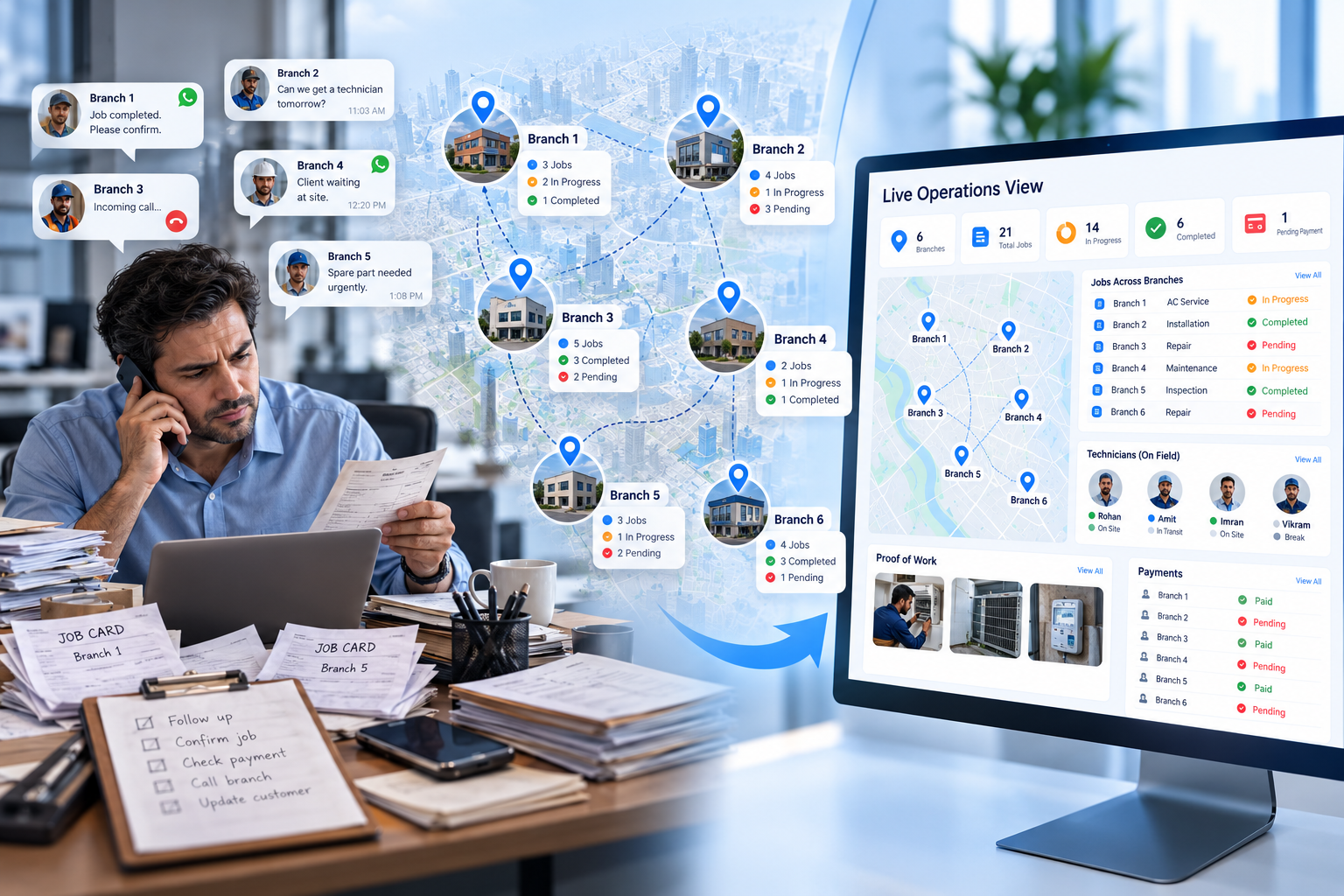
Most software advice is written for two kinds of companies: the single-shop operation where the owner can see everything from the counter, and the enterprise with an IT department. Almost nobody writes for the person running six branches, which is strange, because that is exactly where visibility breaks.
With one location, you walk the floor. With six, you run on phone calls and whatever the branch heads choose to tell you. The phone in your foreman's pocket already knows where the job stands. The office finds out on Friday, when the registers are reconciled and the week's surprises surface all at once.
The gap has a specific shape. It is not that work is not happening. It is that the record of the work lives in people's heads, on paper job cards, and in WhatsApp groups that nobody can search three weeks later. Each branch develops its own version of the truth. The owner then spends evenings calling branch heads to assemble a picture that is already out of date by morning.
What follows is how the businesses that have solved this actually did it. Not with more reporting pressure on branch managers, but with field service management software shaped around one hard constraint: field teams will only feed the system if the system costs them almost nothing. Our own build practice for this category is documented at https://www.accucia.com/services/field-service-management, and that constraint is where every successful project we have delivered started.
What field teams will actually use
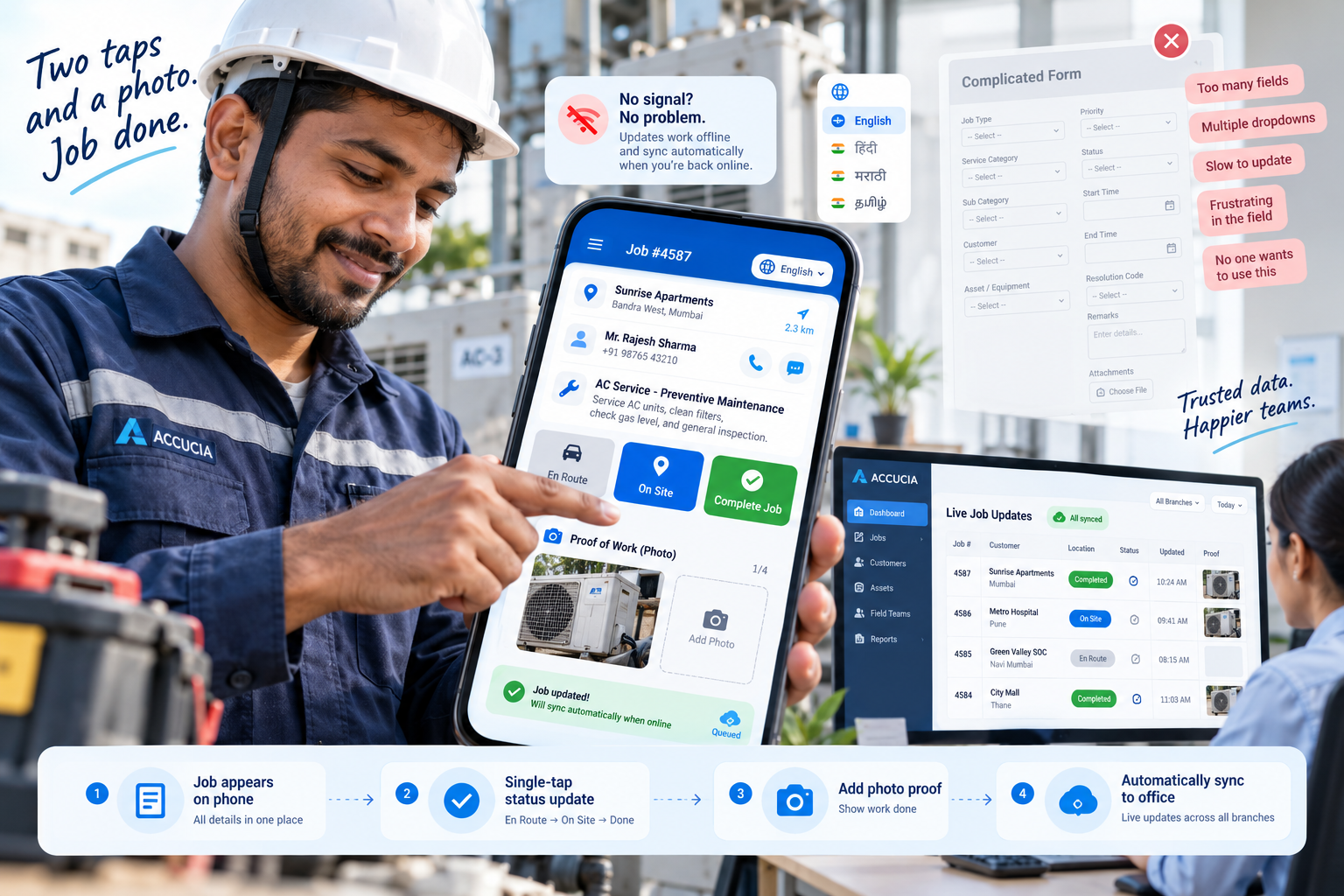
Here is the rule we have learned to treat as non-negotiable. If the form takes longer than the job, they stop filling it.
A technician who has just finished a repair will give the system ten seconds. Two taps and a photo is a workable ask. A nine-field form with dropdowns that need scrolling is not, and no amount of management insistence changes that for more than a few weeks. The field data then quietly degrades, the office stops trusting it, and the business is back to phone calls, except now it is also paying for software.
So the field side of a tracking system has to be designed from the technician's thumb backwards. The job appears on their phone with everything they need: location, contact, what was promised. Status changes are single taps. Proof of work is the camera, not a text description. Anything the system can infer on its own, arrival at site, time on job, travel between jobs, it should infer rather than ask.
Two practical details decide adoption in India specifically. The app has to behave sensibly where connectivity is patchy, holding updates locally and syncing when the network returns, because a basement pump room or a factory floor does not care about your architecture diagram. And it has to respect that many field staff are more comfortable in their own language than in English menus.
One more honest point. Tracking that feels like surveillance gets resisted; tracking that removes work gets adopted. When the same app that reports location also eliminates the evening call to the office, the trade feels fair to the person carrying the phone. Design for that trade explicitly.
What the office needs back
Flip to the office side and the requirements are just as concrete. Three streams of information, flowing in without anyone asking for them.
Job status first. Every open job, every branch, one screen: assigned, in progress, blocked, done. The point is not decoration on a dashboard. The point is that the Friday surprise disappears, because a job that has been stuck for three days is visible on day one, while something can still be done about it.
Proof of work second. Photos from the site, the customer's acknowledgement, time stamps that the system captured itself. This settles disputes before they grow, with customers and sometimes with your own teams. When a client claims the work was not completed, the job record answers in thirty seconds, and nobody has to reconstruct events from memory.
Payment state third, and this is the one owners feel most. A job that is finished but not billed, or billed but not collected, is invisible in most multi-branch operations until month end. When the field update, the invoice and the collection status live in one system, the owner can see at any moment which completed work has not yet turned into money. For service businesses attached to manufacturing clients, where a single industrial customer may have jobs running at several sites, that one view changes the monthly cash conversation entirely. We see this pattern often in our industrial work, which sits at https://www.accucia.com/industries/manufacturing-industrial.
Notice what all three streams share: none of them require a branch manager to write a report. The system assembles the picture as a side effect of field staff doing their jobs. That is the entire trick.
Where AI fits
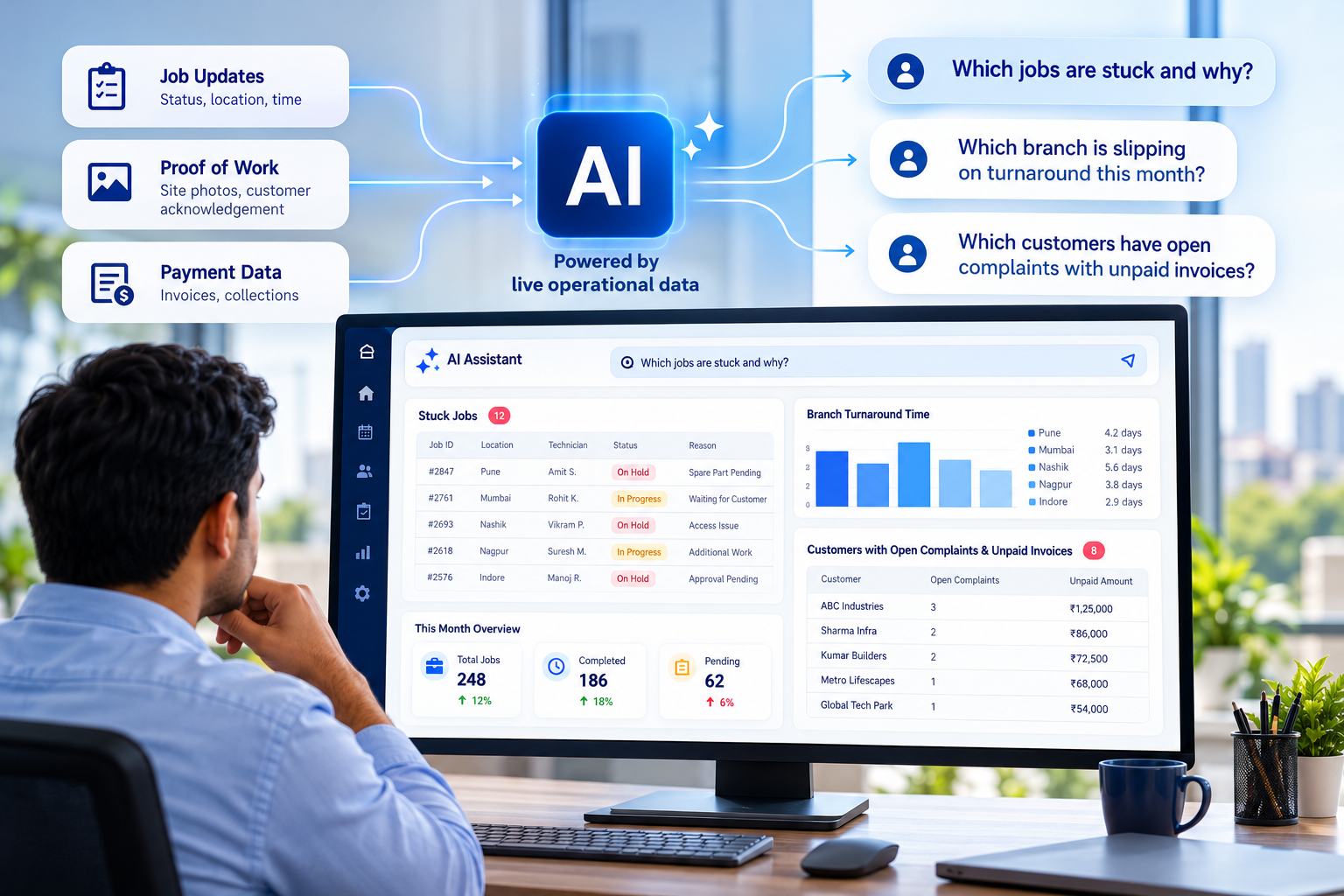
Once job, proof and payment data flow into one system, a newer capability becomes practical: asking the system questions in plain language.
The questions an owner actually has are conversational, not report-shaped. Which jobs are stuck and why. Which branch is slipping on turnaround this month. Which customers have open complaints alongside unpaid invoices. Traditionally each of those needs someone to build a report, which means they get asked monthly instead of daily.
An AI layer on top of a field service system changes the asking cost. The owner types the question the way they would ask a colleague, and the answer comes from live operational data. We frame this deliberately as a capability to build toward rather than magic to buy: the answers are only as good as the data discipline underneath, which is why the field app design above comes first. Get the two-tap updates right and the AI layer has something true to read. Get them wrong and it summarises fiction confidently.
For teams who want the full build view, including how the plumbing of such a system comes together, we keep a detailed guide at https://www.accucia.com/blog/how-to-create-field-force-management-software-a-complete-guide-for-modern-businesses. This article is the owner's view; that one is the builder's.
Accucia's view
Multi-location service businesses do not have a reporting problem, they have a capture problem, and capture is won or lost on the technician's phone in the ten seconds after a job ends. Build the field side so light that using it beats not using it, and the office side assembles itself: live job status, proof of work, payment state, and eventually an AI layer worth asking questions. Buy or build in that order, and judge every field service management product by the slowest-thumbed technician who will have to live with it.
Start with a free AI Readiness Assessment of your field operation, or message us on WhatsApp at https://wa.link/1bwdd2.
FAQ
What should field service management software capture from technicians?
As little as possible, captured as fast as possible. Job status in single taps, proof of work through the camera, and everything the system can infer on its own, like arrival time and time on site, inferred rather than asked. If an update takes longer than a phone call, field teams will go back to phone calls.
How do multi-location service businesses get field staff to adopt tracking apps?
By making the app remove work instead of adding it. When status updates replace the evening call to the office, and the app works offline and in the technician's preferred language, adoption follows. Tracking that only serves management gets resisted; tracking that saves the field team time gets used.
What visibility should the owner of a multi-branch service business expect?
Three live streams without asking anyone: job status across every branch on one screen, proof of work with photos and timestamps attached to each job, and payment state showing which completed work is unbilled or uncollected. The test is whether a stuck job becomes visible on day one rather than at the Friday reconciliation.
Can AI replace reports in a field service operation?
It can replace the waiting. An AI layer over live field data lets an owner ask conversational questions, like which jobs are stuck or which branch is slipping, and get answers immediately instead of commissioning a report. The quality depends entirely on capture discipline in the field app underneath.
Unlock smarter field service management with AI