MCP Integration vs Custom API: AI Layer on Your ERP
Quick Answer
A custom API integration connects one AI assistant to your ERP through code you write and maintain for that pairing. An MCP integration wraps your ERP once, as an MCP server with defined tools, permissions and an audit log, so any MCP-compatible assistant can read from it and act on it. For a first AI layer on an existing system, MCP is usually the better choice, because the permission and audit layer is built once and the assistant can be changed without rebuilding the integration. By Mr. Sumeet Katariya, Accucia Softwares Pvt. Ltd.
The problem both approaches solve
The useful version of AI in a mid-sized business is not a chatbot that knows general facts. It is an assistant that can answer "which AMC contracts expire this month?" from the live contract table, or "what is outstanding on project B as of now?" from the live ledger, and, where you allow it, take an action: raise the reminder, draft the demand, create the task.
That requires a connection between the assistant and the system of record. Both approaches in the title are ways of building that connection. The difference is in what you build, what you rebuild, and where the controls live.
Custom API integration: what you build and what you rebuild
Your ERP has an API, or can be given one. A custom integration takes a specific AI assistant, say the one your team already uses, and writes code that lets it call that API: authenticate, fetch the contracts, format the answer, perhaps trigger an action.
This works. It is how most first AI projects were built in 2024 and 2025. The cost shows up later, in three places.
It is specific to the assistant. When the business wants to use a second assistant, or the first vendor changes its interface, the integration is written again.
The permission logic lives in the integration code. Who may see salaries, who may approve a payment, what the assistant is allowed to change: all of it is custom code, per integration, and it drifts.
The audit trail is whatever the developer remembered to log.
MCP integration: one server, many assistants
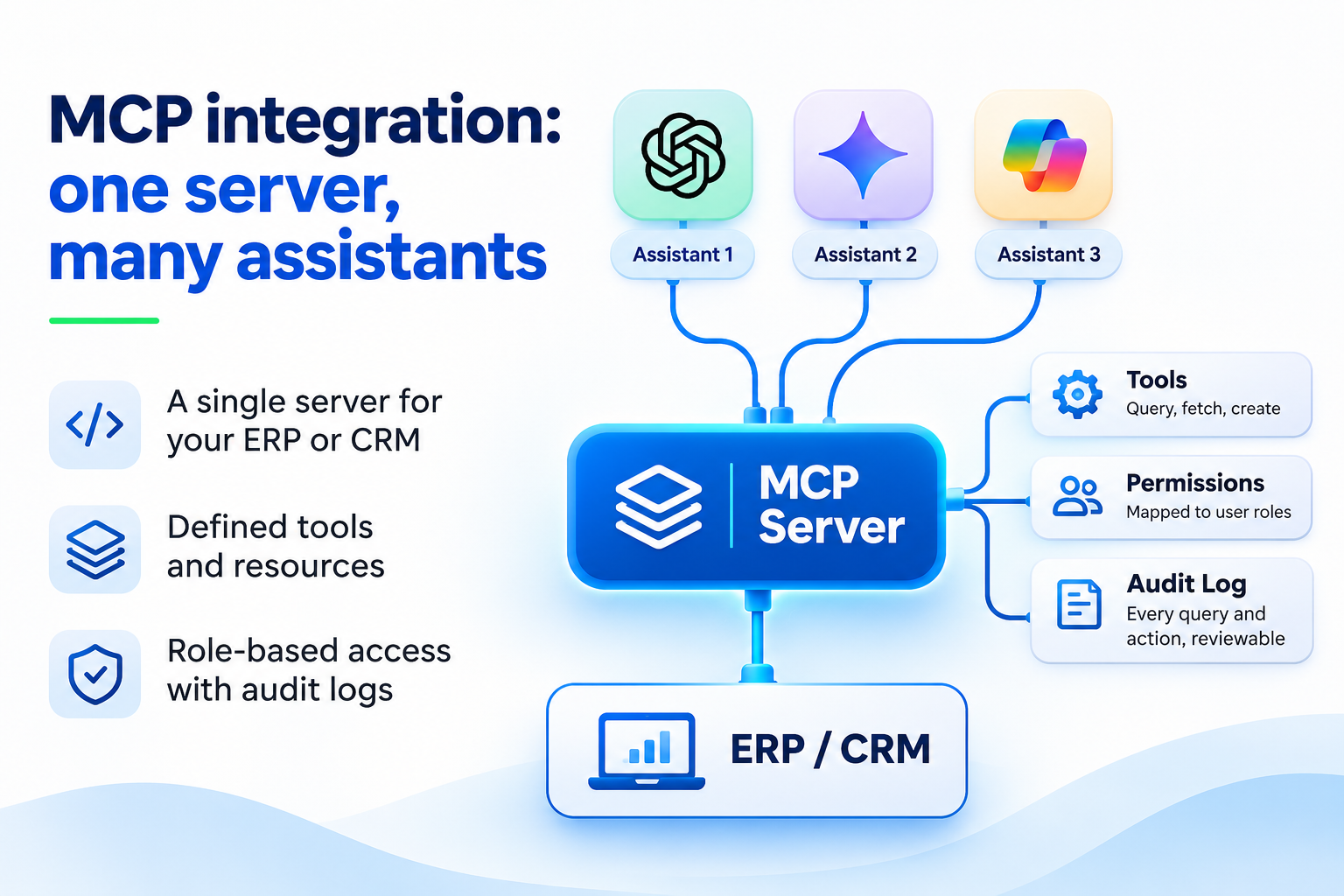
MCP, the Model Context Protocol, is an open standard that lets AI assistants connect to, read from and act on live business systems. The protocol's own documentation defines it as "an open-source standard for connecting AI applications to external systems" and offers the comparison that "just as USB-C provides a standardized way to connect electronic devices, MCP provides a standardized way to connect AI applications to external systems." The practical way to think about it is a universal adapter between your systems and AI.
In an MCP integration, we build an MCP server for your ERP or CRM. That server exposes a defined set of tools and resources: "list contracts expiring in a date range", "get outstanding by project", "create a follow-up task". Each tool carries its own permission mapping to your user roles, so the assistant sees and does only what that user could do in the ERP itself. Every query and action is logged and reviewable.
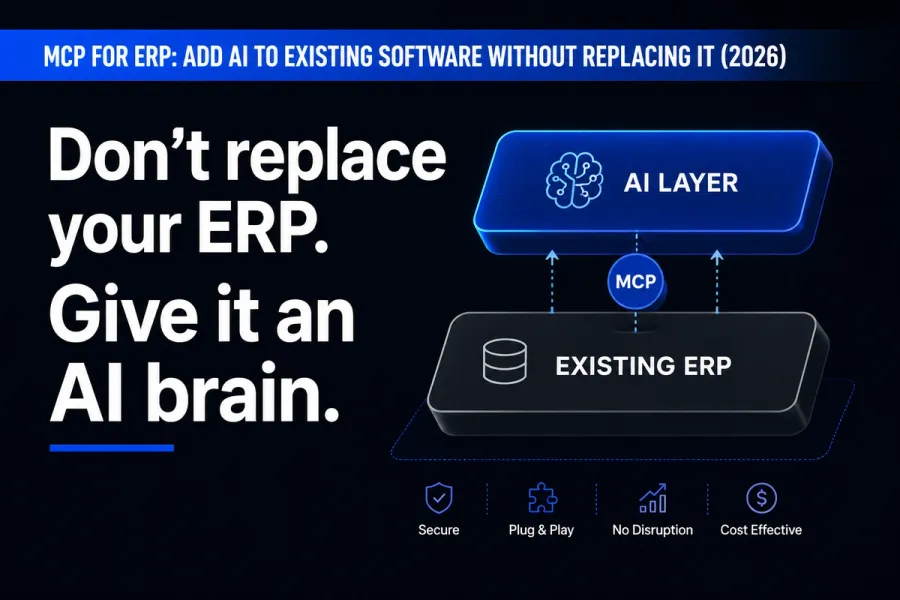
Any MCP-compatible assistant then connects to that one server. Change the assistant, keep the server. Add a second assistant for a different team, same server. The ERP itself is untouched: no migration, no re-platforming.
Where the permission layer lives, and why it decides the choice
If we had to reduce the decision to one row of that table, it would be permissions.
An assistant connected to your ERP is a new user with unusual reach. It can ask for everything, very quickly, in natural language. The only safe version is one where the assistant inherits the role of the person using it: the sales head sees pipeline, not payroll; the branch manager sees their branch, not all of them; nobody can approve a disbursal through a chat window unless they could approve it in the system.
In a custom integration, that logic is written into the integration, and the next integration writes it again, slightly differently. In an MCP server, it is written once, against the ERP's own roles, and every assistant that connects inherits it. The audit log sits in the same place. When procurement or an auditor asks how the AI is controlled, the answer is one layer, not a collection of scripts.
Why the permission layer is where AI projects actually fail
This is not a theoretical preference. Gartner predicted in July 2024 that at least 30 percent of generative AI projects would be abandoned after proof of concept by the end of 2025, "due to poor data quality, inadequate risk controls, escalating costs or unclear business value." Two of those four, data quality and risk controls, are decided by where the connection to the business system is built and how it is governed. A per-assistant integration multiplies both problems with every assistant added.
McKinsey's State of AI survey published on 5 November 2025 reported that 88 percent of respondents' organisations use AI in at least one business function, while only 7 percent said AI had been fully scaled across the organisation. Scaling is the moment a second team wants a second assistant on the same data. With a custom integration that is a second project; with an MCP server it is a connection.
What to check in your own systems before an MCP project
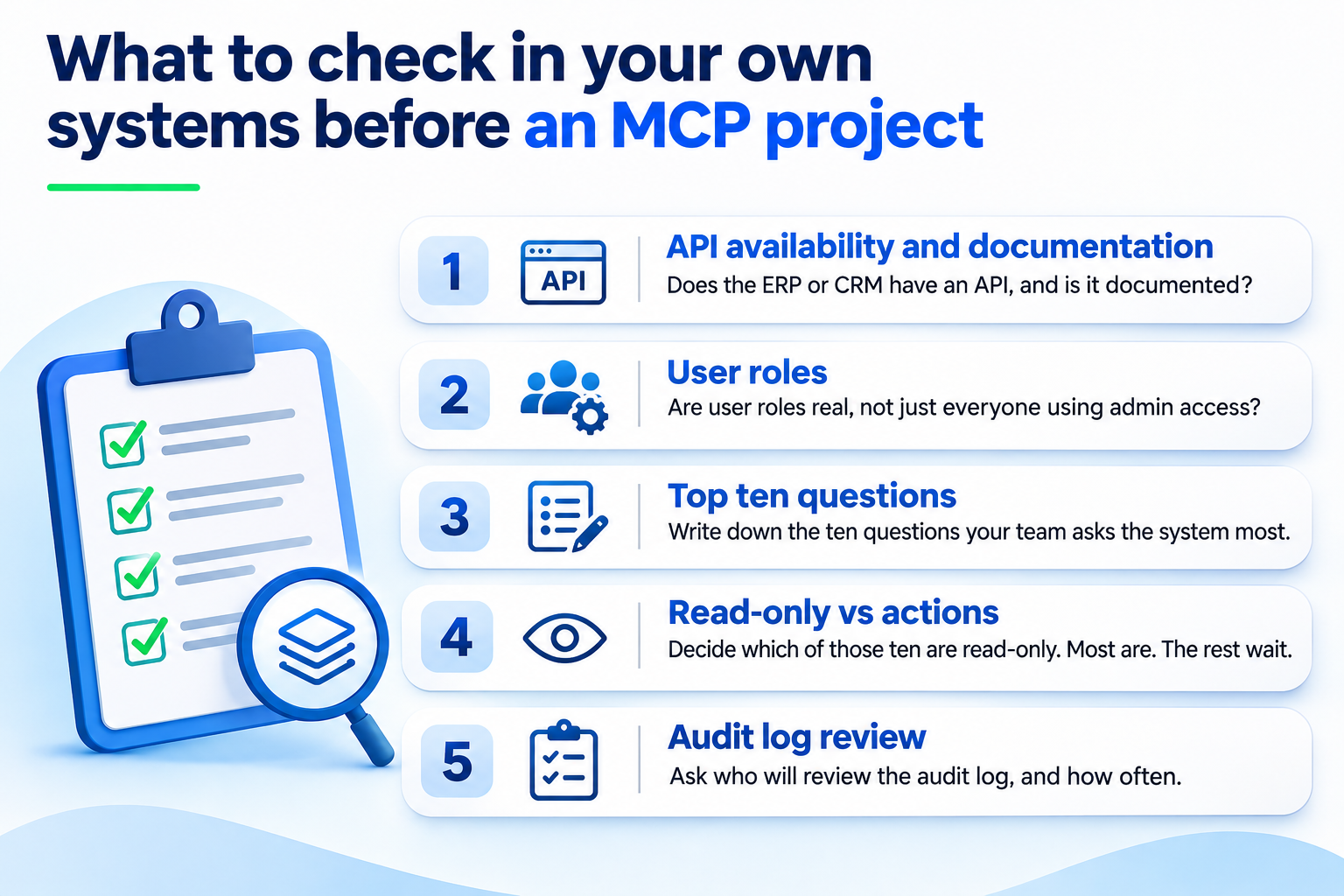
Does the ERP or CRM have an API at all, and is it documented? If not, the first piece of work is an integration layer, whichever approach you choose.
Are user roles in the system real? If everyone logs in as admin, there is nothing for the MCP server to inherit, and the permission layer has to be designed before the AI layer.
Write down the ten questions your team asks the system most. Those are the first tools. If the list is longer than ten, the project is too big.
Decide which of those ten are read-only. Most are. The rest wait.
Ask who will review the audit log, and how often. A log nobody reads is a log.
Common mistakes in first AI-on-ERP projects
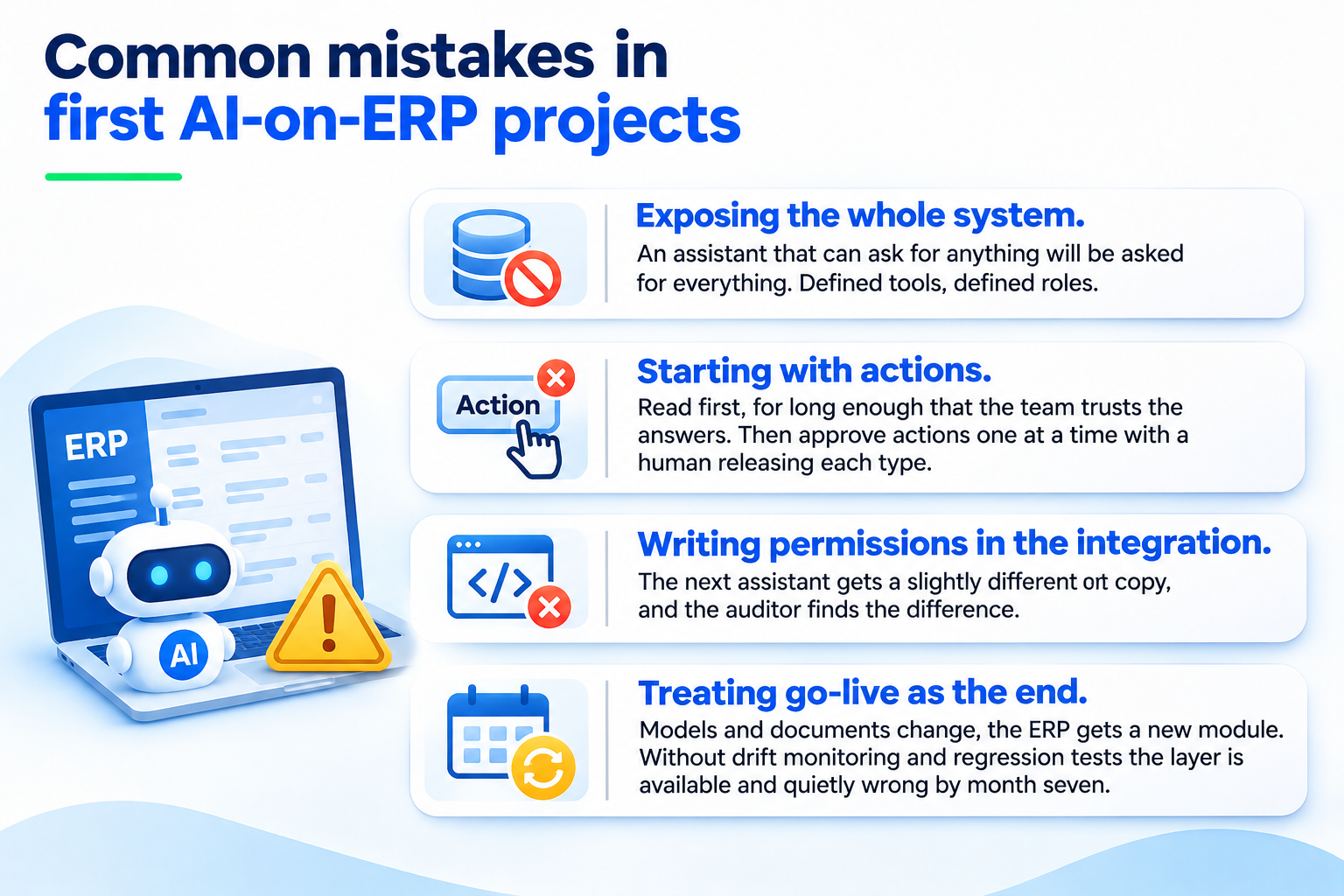
Exposing the whole system. An assistant that can ask for anything will be asked for everything. Defined tools, defined roles.
Starting with actions. Read first, for long enough that the team trusts the answers. Then approve actions one at a time with a human releasing each type.
Writing permissions in the integration. The next assistant gets a slightly different copy, and the auditor finds the difference.
Treating go-live as the end. Models change, documents change, the ERP gets a new module. Without drift monitoring and regression tests the layer is available and quietly wrong by month seven.
What this looks like in month three
A quarter after the read-only layer goes live, the ten tools are answering the ten questions and the team has stopped asking a person for them. The audit log has been reviewed and nothing in it surprised anyone, which is the point. At least one action, usually a task or a reminder, is live under human approval. A second team has asked for access, and the answer was a role mapping rather than a new project. And the regression tests have caught at least one change before it reached users.
What a first MCP project looks like
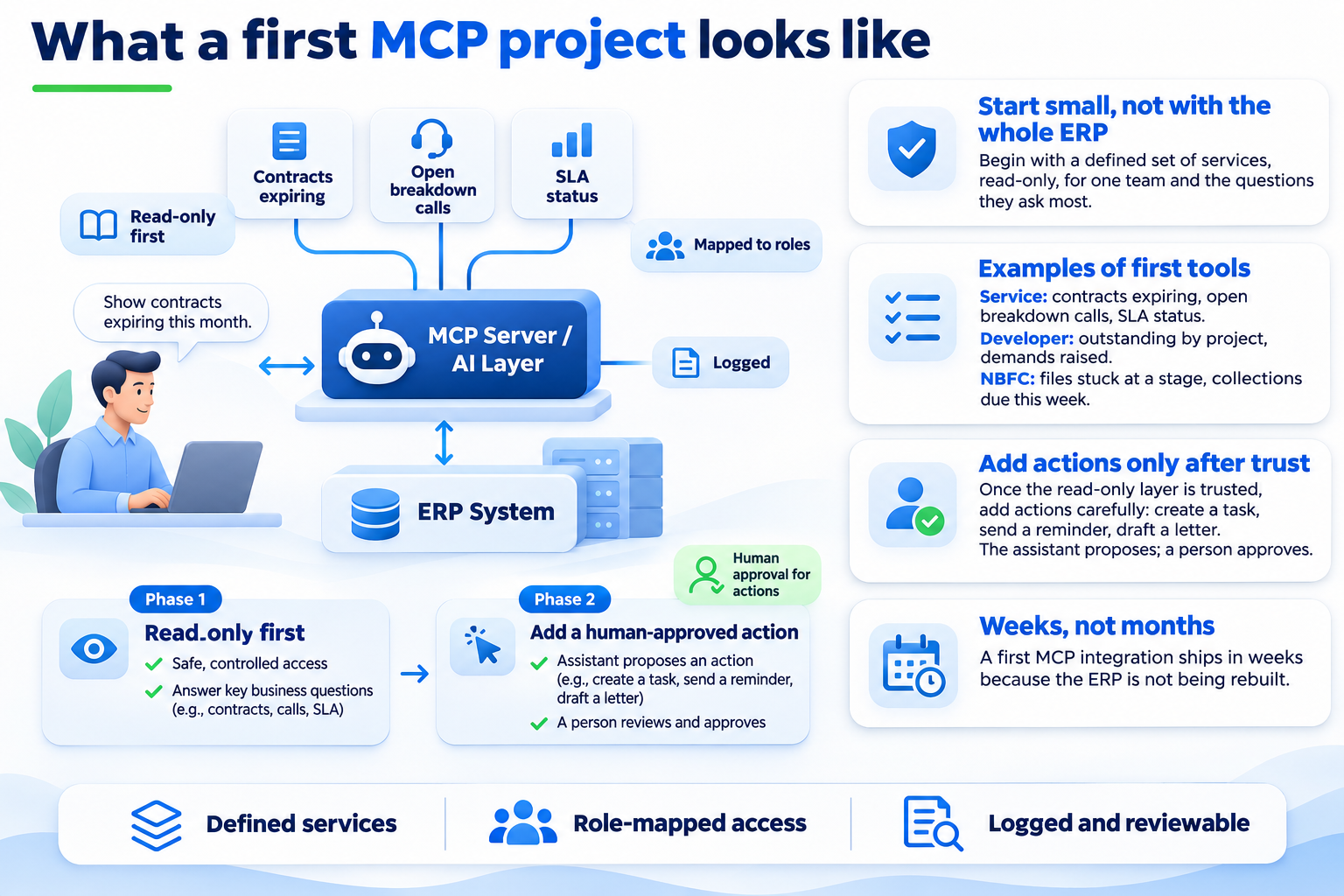
The mistake is to start by exposing the whole ERP. The right first project is a defined set of services, read-only, for one team, with the questions that team asks most.
For a service company, that might be contracts expiring, open breakdown calls and SLA status. For a developer, outstanding by project and demands raised this month. For an NBFC, files stuck at a stage and collections due this week. A short list of tools, each mapped to roles, each logged.
Once the read-only layer has run and the team trusts it, actions are added with the same discipline: create a task, send a reminder, draft a letter for a human to release. The assistant proposes; a person with the right role approves. Our note on AI agents for enterprise operations lists the use cases that have actually shipped, and they share this shape.
A first MCP integration on a defined set of services ships in weeks rather than months, because the ERP is not being rebuilt. The MCP live demo we recorded in May shows the mechanics end to end: a custom MCP server, an assistant connecting to it, questions answered from live data, and tool chaining across more than one call.
Proof: an agent reading live HR data through MCP
We run this in production ourselves. Sellora, a system we built, has MCP built in, and an AI agent reads and acts on its live HR data through that server under role permissions. It is the proof artefact we point to when a buyer asks whether this works outside a demo.
For reference on what embedded AI does to a team's day once the data layer is right, a large Indian pharmaceutical company runs a knowledge assistant we built inside the application its employees already use: 75 percent less time per query, 95 percent accuracy, 40 percent faster onboarding and an eight-month payback. That system is enterprise RAG rather than MCP, but the lesson carries: the AI is the second sentence, the connected data is the first.
And after go-live, the layer needs managed AI operations: drift monitoring, regression tests before deployments, deprecations tracked ahead of the date. A connection is not a product; it is a system that someone has to keep honest.
Accucia's view
Build the AI layer on your ERP once, as an MCP server with permissions and audit at the centre, and treat the assistant as replaceable. A custom API integration is the right tool for a single permanent pairing and the wrong foundation for a company that will, within a year, want three assistants and an auditor's sign-off. Your existing system comes first. AI is the second sentence.
Watch: Connect Claude AI to Your ERP and CRM with MCP, Live Demo for Mid-Market Businesses.
Read the edition: The Enterprise AI Edge, Ed.24, An AI agent that reads live HR data through MCP.
If your ERP or CRM holds the answers and your team still asks a person for them, the free AI Readiness Assessment maps which systems an assistant could reach today and which tools to build first.
FAQ
What is the difference between MCP integration and a normal API integration?
A normal API integration connects one specific AI assistant to a system through code written for that pairing, with permissions and logging inside that code. An MCP integration wraps the system once as an MCP server with defined tools, role-based permissions and an audit log, so any MCP-compatible assistant can connect to it without a new integration.
Do we have to replace our ERP to add an AI assistant?
No. An MCP server sits on top of the existing ERP or CRM and exposes defined services to the assistant. The ERP keeps running as it is, with no migration or re-platforming, and the assistant sees only what the connected user's role allows.
How is an MCP integration kept secure?
Permissions are mapped per tool to the ERP's own user roles, so the assistant inherits the rights of the person using it. Every query and action is logged and reviewable. A sensible first project is read-only on a defined set of services, with actions added later under human approval.
Can one MCP server cover more than one business system?
The usual design is one MCP server per system of record, each with its own tools and role mapping, and an assistant that connects to several servers at once. That keeps each system's permissions and audit trail in one place while letting the assistant answer questions that span the ERP, the CRM and the document store.
How long does a first MCP integration take?
A first integration on a defined set of services ships in weeks rather than months, because the underlying system is not rebuilt. The work is defining the tools, mapping permissions to roles and connecting the assistant, then expanding from a read-only layer to approved actions as the team gains confidence.
Start your MCP integration with a free AI Readiness Assessment.